LocalSend
Send files between nearby devices — any brand, no internet
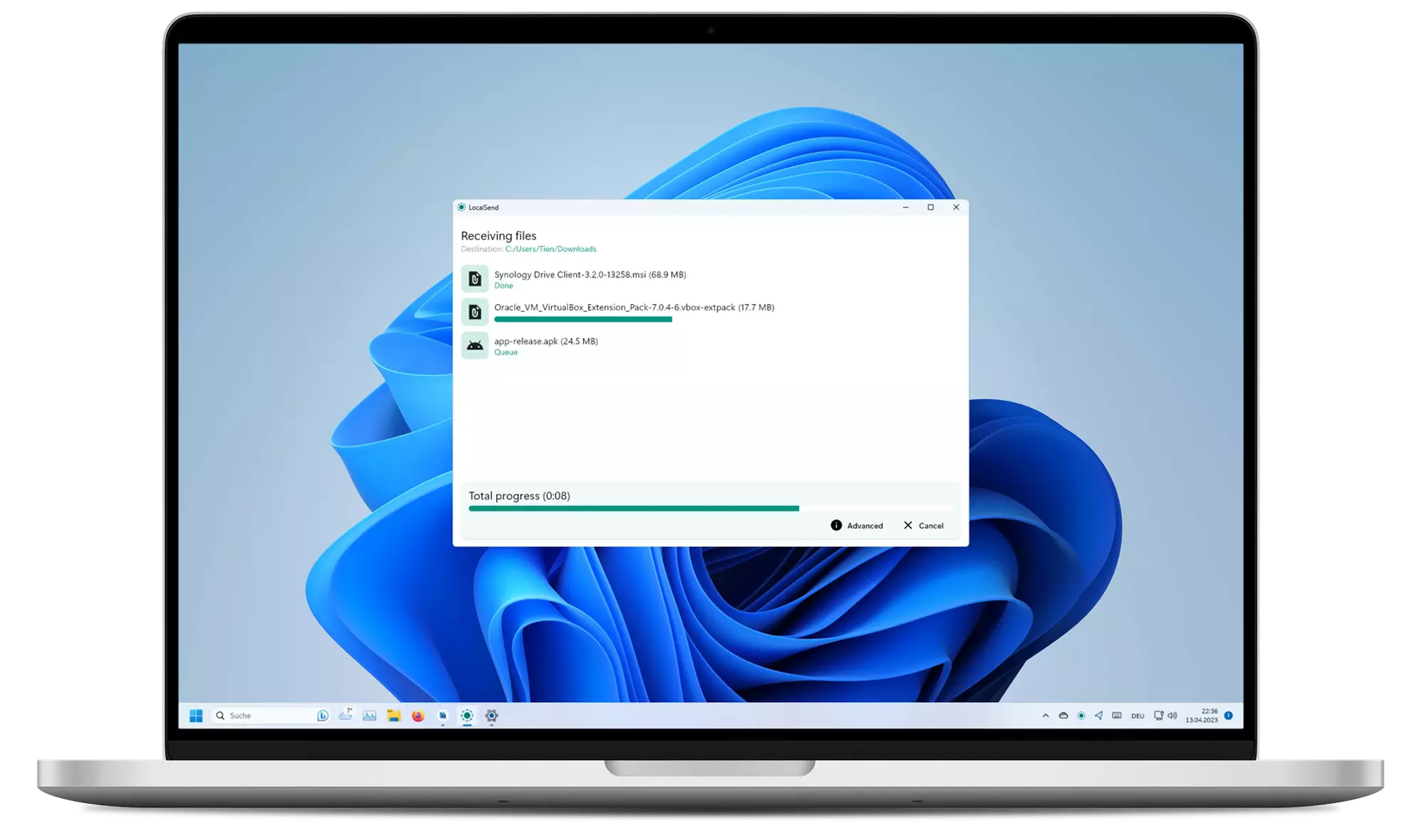
Images from the project's own README.
What it does
LocalSend shares files and text between phones and computers on the same Wi-Fi network. It works across iPhone, Android, Windows, Mac and Linux without accounts or the cloud.
Who it's for
Anyone who has ever emailed a file to themselves.
Key features
- Works across all major devices
- No internet or account needed
- Encrypted transfers
Often used instead of: AirDrop, Nearby Share, Snapdrop
Compatibility
NOVI never presents a guess as verified.- WindowsEvidence-supported
Available as an official WinGet package (“LocalSend.LocalSend”).
- macOS (Apple Silicon)Evidence-supported
Available as an official Homebrew Cask package (“localsend”).
- macOS (Intel)Evidence-supported
Available as an official Homebrew Cask package (“localsend”).
- LinuxEvidence-supported
Available as an official Flatpak (Flathub) package (“org.localsend.localsend_app”).
What do these labels mean?
- Confirmed
- NOVI users have completed verified installations on this system.
- Evidence-supported
- The project publishes an official build or package for this system.
- Inferred
- Likely to work based on how the project is built, but not confirmed.
- Unknown
- We have not found enough evidence either way.
- Unsupported
- The project does not support this system.
How to get it
Direct downloadDownload the official installer from the project or its publisher, then open it. Difficulty: Easy.
WindowsDirect downloadGuided
Download from the official release
File attached to the project's official GitHub release. NOVI links to it; the file comes straight from github.com, not from NOVI. Where this link comes from
- 1
After it downloads. Open the downloaded file (usually in your Downloads folder) and follow the installer. If Windows SmartScreen warns you, check that the file came from the address shown above before choosing to run it.
Install with WinGet
Installs Windows applications using WinGet, Microsoft's package manager included with Windows 10 and 11. You run these steps yourself; NOVI does not install anything from this website.
- 1
Open Windows Terminal or PowerShell. Right-click the Start button and choose Terminal. WinGet is included with Windows 10 (recent updates) and Windows 11; type “winget --version” to check.
- 2
Copy this command and press Enter. It installs the package from Microsoft's official WinGet catalogue. Windows may ask for administrator approval for some installers; only approve it if you trust this software.
winget install --id LocalSend.LocalSend --exact --source winget --accept-package-agreements --accept-source-agreements - 3
Check it worked. The app appears in your Start menu. This command lists it as installed:
winget list --id LocalSend.LocalSend --exact --source winget - 4
See the official package listing. Shows the publisher's installer that WinGet downloads. Open
macOS (Apple Silicon)Direct downloadGuided
Download from the official release
File attached to the project's official GitHub release. NOVI links to it; the file comes straight from github.com, not from NOVI. Where this link comes from
- 1
After it downloads. Open the downloaded file from your Downloads folder. For a .dmg, drag the app into Applications; for a .zip, double-click to unpack it, then move the app into Applications. The first time you open it, macOS may ask you to confirm.
Install with Homebrew Cask
Installs macOS applications using Homebrew, a widely used package manager for macOS. You run these steps yourself; NOVI does not install anything from this website.
- 1
Make sure Homebrew is installed. Homebrew is a free, widely used tool for installing software on a Mac. Open the Terminal app and type “brew --version”. If you see a version number you already have it; otherwise follow the one-line instructions on brew.sh. Open
- 2
Copy this command into Terminal and press Return. It installs the package from Homebrew's official catalogue only. Homebrew checks the download against a known checksum.
brew install --cask homebrew/cask/localsend - 3
Check it worked. The app appears in your Applications folder. You can also run this command to see the installed version:
brew list --cask --versions localsend - 4
See the official package listing. Shows exactly what Homebrew installs and where it comes from. Open
macOS (Intel)Direct downloadGuided
Download from the official release
File attached to the project's official GitHub release. NOVI links to it; the file comes straight from github.com, not from NOVI. Where this link comes from
- 1
After it downloads. Open the downloaded file from your Downloads folder. For a .dmg, drag the app into Applications; for a .zip, double-click to unpack it, then move the app into Applications. The first time you open it, macOS may ask you to confirm.
Install with Homebrew Cask
Installs macOS applications using Homebrew, a widely used package manager for macOS. You run these steps yourself; NOVI does not install anything from this website.
- 1
Make sure Homebrew is installed. Homebrew is a free, widely used tool for installing software on a Mac. Open the Terminal app and type “brew --version”. If you see a version number you already have it; otherwise follow the one-line instructions on brew.sh. Open
- 2
Copy this command into Terminal and press Return. It installs the package from Homebrew's official catalogue only. Homebrew checks the download against a known checksum.
brew install --cask homebrew/cask/localsend - 3
Check it worked. The app appears in your Applications folder. You can also run this command to see the installed version:
brew list --cask --versions localsend - 4
See the official package listing. Shows exactly what Homebrew installs and where it comes from. Open
LinuxDirect downloadGuided
Download from the official release
File attached to the project's official GitHub release. NOVI links to it; the file comes straight from github.com, not from NOVI. Where this link comes from
- 1
After it downloads. Open the downloaded file with your software centre, or follow the project's instructions for this file type (AppImage files need to be marked as executable first).
Install with Flatpak (Flathub)
Installs sandboxed Linux applications from Flathub for your user account only. You run these steps yourself; NOVI does not install anything from this website.
- 1
Make sure Flatpak and Flathub are set up. Many Linux systems include Flatpak. Flathub's setup page has short instructions for every major distribution. Open
- 2
Copy this command into a terminal and press Enter. It installs the app from Flathub for your user account only — no administrator password needed — and runs it in Flatpak's sandbox.
flatpak install --user flathub org.localsend.localsend_app - 3
Check it worked. The app appears in your applications menu. This command shows its details:
flatpak info --user org.localsend.localsend_app - 4
See the official Flathub page. Shows the app's permissions and who publishes it. Open
NOVI never installs software from your browser. Downloads come directly from the project or its publisher. Only install software you trust.
Get it working
A free, personal setup plan for your computer: the official download, exact steps, and a checklist. Saved in your dashboard, with help if you get stuck. NOVI never installs or runs anything on your computer.
Requirements
- Homebrew Cask for automatic install — Installs macOS applications using Homebrew, a widely used package manager for macOS. The NOVI companion checks whether it is present.
- WinGet for automatic install — Installs Windows applications using WinGet, Microsoft's package manager included with Windows 10 and 11. The NOVI companion checks whether it is present.
- Flatpak (Flathub) for automatic install — Installs sandboxed Linux applications from Flathub for your user account only. The NOVI companion checks whether it is present.
Trust and security
- license
Published under the Apache License 2.0 (Apache-2.0).
Licence detected by GitHub from the repository's licence file. Read the full licence before modifying or redistributing.
Source - distribution
Distributed through Homebrew Cask, an established package source.
The package manager checks downloads against a published checksum before installing.
Source - distribution
Distributed through WinGet, an established package source.
The package manager checks downloads against a published checksum before installing.
Source - distribution
Distributed through Flatpak (Flathub), an established package source.
The package manager checks downloads against a published checksum before installing.
Source
NOVI checks licences, maintenance activity and distribution sources. NOVI has not audited this project's code and does not certify it as secure. Only install software you trust.
Reviews
No reviews yet
Be the first to share your experience with LocalSend. NOVI never shows invented reviews.
Sign in to write a review.
Recent releases
From GitHubv1.18.2Aug 21, 2026
This release fixes compatibility issues with 1.17.0 and earlier. Note: The Windows binaries have been updated to include a signature. - feat: drag and drop files into the "Receive via link" browser page - feat(desktop): allow customizing the web share pages by placing HTML files in a `web` folder next to the executable - feat(cli): add version info to the Windows executable - feat(linux): set actual version in the AppImage - security: do not follow HTTP redirects sent by peers - fix: restore compatibility with 1.17.0 and earlier versions on missing multicast networks - fix: devices running 1.17.0 and earlier could not add 1.18.0+ device as favorite - fix: ignore proxies, fixes "TLS info not found" when a system proxy (e.g. Shadowrocket) is enabled - fix: automatically restart the HTTP / multicast server when it dies or when the app resumes - fix: drag and drop with a mix of folders and files - fix: during transfer, add bottom padding when Advanced is open (@Chethan616) - fix: do not crash at startup when the executable path cannot be resolved (@Shlomo116) - fix(android): ignore unknown or invalid file modification times when reading files - i18n: add Armenian
Full release notesv1.18.1Aug 12, 2026
Android+iOS only hotfix update. See [1.18.0](https://github.com/localsend/localsend/releases/tag/v1.18.0) for the full release. - fix: revert button icon sizes to 24 - fix: when sending a message that is accepted immediately, a ghost device list tile appears - fix(mobile): when sending a link message, the "Open" button overflows - fix(android): add missing ACCESS_LOCAL_NETWORK permission that is required for Android 17+ - i18n: add Belarusian (@pavel-miniutka), Irish (@aindriu80)
Full release notesv1.18.0Aug 10, 2026
This release is also the first release of the CLI. It uses the same Rust library as the Flutter app. The Rust rewrite of the core networking and file I/O logic is complete. You should notice that in improved transfer speeds. Note: The Windows binaries have been updated to include a signature. ### Summary - feat(cli): initial CLI release - feat: receive via link - feat: custom color theme via color picker - feat: ipv6 support - feat: checksum support (enabled by default) - feat: automatically accept files by favorite devices by default - feat: use decimal units for file sizes (1 GB = 1000 MB) to match macOS, iOS, Android, and Linux - feat: enable starting text share via command line using `--text` or `-t` flags (@guilhermetiscoski) - feat: improve remaining time formatting for long transfers (@ShlomoCode) - feat: change duplicate file naming from "file-1.txt" to "file (1).txt" format (@kartoshka95) - feat(android, ios, macos): respect system-wide animation preferences on first app startup (@nitheesh-daram) - feat(android): run file transfer in background - feat(android): add quick settings tile for instant app launch (@Voltra) - feat(windows): add LocalSend to share sheet (@chenxd
Full release notesv1.17.0Feb 20, 2025
### Summary A small interim release before WebRTC is stable (https://github.com/localsend/localsend/pull/2204) - feat: add advanced setting to filter network interfaces (@Tienisto) - feat(mobile): swipe gesture to select multiple media files (@Tienisto) - feat(windows): when pasting an image, automatically convert it to PNG (@BrianMwit) - feat(android): add option to open gallery when image/video was automatically saved (@Tienisto) - fix: path traversal vulnerability when saving files (@Tienisto) - fix: black screen when tapping on "Back" twice in "Share via link" (@Tienisto) - fix(macos): window disappears on command key when minimize to tray is enabled (@Tienisto) - fix(windows): do not poll local IP resulting in unwanted location permissions (@Tienisto) [Full Changelog](https://github.com/localsend/localsend/blob/main/app/assets/CHANGELOG.md)
Full release notesv1.16.1Nov 5, 2024
### Summary - feat: show exact error message when using IP address dialog or favorite dialog (@Tienisto) - feat(desktop): highlight file when tapping "Show in folder" (@Tienisto) - fix(android): properly close app on back gesture (@Tienisto) [Full Changelog](https://github.com/localsend/localsend/blob/main/app/assets/CHANGELOG.md)
Full release notes
Where this information comes from
- Description, audience and features: Written by NOVI editors from the project's README and official website. link
- Statistics, licence and releases: GitHub API link
- Available through Homebrew Cask: Official package registry link
- Available through WinGet: Official package registry link
- Available through Flatpak (Flathub): Official package registry link
- Direct download links: Files attached to the project's official GitHub release v1.18.2 link
GitHub data last refreshed 3 days ago. LocalSend is the property of its authors. NOVI is not affiliated with this project.