IINA
The modern video player for Mac
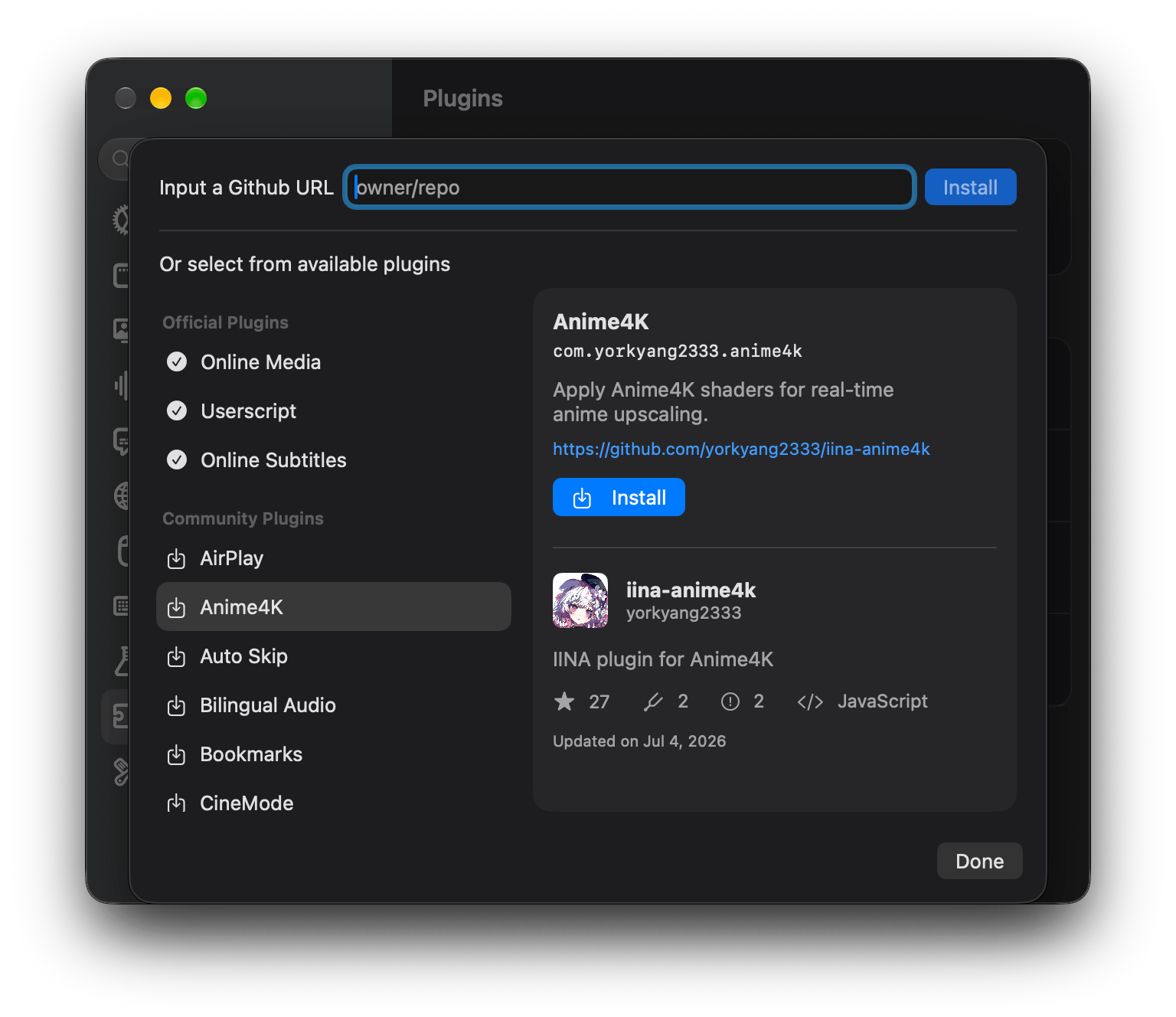
Images from the project's own README.
What it does
IINA is a media player designed specifically for macOS. It plays almost any video or audio file and fits right in with the look and features of a modern Mac.
Who it's for
Mac users who want a better default video player.
Key features
- Plays nearly every format
- Native macOS design with dark mode
- Picture-in-picture and gesture controls
Often used instead of: QuickTime Player, VLC
Compatibility
NOVI never presents a guess as verified.- WindowsUnknown
No official build, package or documentation for this system was found.
- macOS (Apple Silicon)Evidence-supported
Available as an official Homebrew Cask package (“iina”).
- macOS (Intel)Evidence-supported
Available as an official Homebrew Cask package (“iina”).
- LinuxUnknown
No official build, package or documentation for this system was found.
What do these labels mean?
- Confirmed
- NOVI users have completed verified installations on this system.
- Evidence-supported
- The project publishes an official build or package for this system.
- Inferred
- Likely to work based on how the project is built, but not confirmed.
- Unknown
- We have not found enough evidence either way.
- Unsupported
- The project does not support this system.
How to get it
Direct downloadDownload the official installer from the project or its publisher, then open it. Difficulty: Easy.
macOS (Apple Silicon)Direct downloadGuided
Download from the official release
File attached to the project's official GitHub release. NOVI links to it; the file comes straight from github.com, not from NOVI. Where this link comes from
- 1
After it downloads. Open the downloaded file from your Downloads folder. For a .dmg, drag the app into Applications; for a .zip, double-click to unpack it, then move the app into Applications. The first time you open it, macOS may ask you to confirm.
Install with Homebrew Cask
Installs macOS applications using Homebrew, a widely used package manager for macOS. You run these steps yourself; NOVI does not install anything from this website.
- 1
Make sure Homebrew is installed. Homebrew is a free, widely used tool for installing software on a Mac. Open the Terminal app and type “brew --version”. If you see a version number you already have it; otherwise follow the one-line instructions on brew.sh. Open
- 2
Copy this command into Terminal and press Return. It installs the package from Homebrew's official catalogue only. Homebrew checks the download against a known checksum.
brew install --cask homebrew/cask/iina - 3
Check it worked. The app appears in your Applications folder. You can also run this command to see the installed version:
brew list --cask --versions iina - 4
See the official package listing. Shows exactly what Homebrew installs and where it comes from. Open
macOS (Intel)Direct downloadGuided
Download from the official release
File attached to the project's official GitHub release. NOVI links to it; the file comes straight from github.com, not from NOVI. Where this link comes from
- 1
After it downloads. Open the downloaded file from your Downloads folder. For a .dmg, drag the app into Applications; for a .zip, double-click to unpack it, then move the app into Applications. The first time you open it, macOS may ask you to confirm.
Install with Homebrew Cask
Installs macOS applications using Homebrew, a widely used package manager for macOS. You run these steps yourself; NOVI does not install anything from this website.
- 1
Make sure Homebrew is installed. Homebrew is a free, widely used tool for installing software on a Mac. Open the Terminal app and type “brew --version”. If you see a version number you already have it; otherwise follow the one-line instructions on brew.sh. Open
- 2
Copy this command into Terminal and press Return. It installs the package from Homebrew's official catalogue only. Homebrew checks the download against a known checksum.
brew install --cask homebrew/cask/iina - 3
Check it worked. The app appears in your Applications folder. You can also run this command to see the installed version:
brew list --cask --versions iina - 4
See the official package listing. Shows exactly what Homebrew installs and where it comes from. Open
NOVI never installs software from your browser. Downloads come directly from the project or its publisher. Only install software you trust.
Get it working
A free, personal setup plan for your computer: the official download, exact steps, and a checklist. Saved in your dashboard, with help if you get stuck. NOVI never installs or runs anything on your computer.
Requirements
- macOS 12 or later — Minimum macOS version declared by the Homebrew package.
- Homebrew Cask for automatic install — Installs macOS applications using Homebrew, a widely used package manager for macOS. The NOVI companion checks whether it is present.
Trust and security
- license
Published under the GNU General Public License v3.0 (GPL-3.0).
Licence detected by GitHub from the repository's licence file. Read the full licence before modifying or redistributing.
Source - distribution
Distributed through Homebrew Cask, an established package source.
The package manager checks downloads against a published checksum before installing.
Source
NOVI checks licences, maintenance activity and distribution sources. NOVI has not audited this project's code and does not certify it as secure. Only install software you trust.
Reviews
No reviews yet
Be the first to share your experience with IINA. NOVI never shows invented reviews.
Sign in to write a review.
Recent releases
From GitHubv1.5.1Nov 6, 2026
IINA 1.5.1 fixes several important issues in 1.5.0 and improves the overall user experience. ## Bug fixes - Fixed an issue where the player window is taller than expected. - Fixed an issue where thumbnails try to show frame outside of video duration #6423. - Fixed an issue where IINA doesn’t quit if using legacy full screen #6424. - Fixed incorrect OSC size when using “Reduced Motion” #6440. - Fixed quick setting controls not updated correctly #6455. - Fixed Clear Playback History doesn’t work. - Fixed wrong play slider orientation for RTL languages #6504. - Fixed permissions/parsing issues of XMLPRC. - Fixed plugin-managed players don’t prevent sleep #6449. - Fixed Assrt online subtitle search doesn’t work #6564. ## Improvements - Clicking on the titlebar menu now highlights the next level folder/file #6448. - Display more potential metadata as track title when the track title is missing #6453. - Left click with ⌘ pressed on doc icon in titlebar shows path menu #6462. - Non-ASCII keys can be now used as keybindings #6474. - Show permission alert if an update changed allowed domain. ## Plugin API - Expose a new `getTheme()` api to get appe
Full release notesv1.5.0Oct 3, 2026
IINA 1.5.0 introduces the biggest interface redesign since its launch. In-app auto update will be published within 24 hours. ## Redesigned Website Check out our new website at [iina.io](https://iina.io) and read our [blog post](https://iina.io/blog/150-release/) about the 1.5.0 release! ## New - Added a new Settings window #6016. - Added a confirmation prompt when deleting keybinding config files #5972. - Split the "Video/Audio" settings page into two pages #5310. - Added a new plugin store in Settings #6081. - Updated the Quick Settings sidebar and added a new Layout pane #6132. - You can now freely change the window aspect ratio by unlocking it #6100. - In the new Layout pane, options are provided to dock sidebars, the OSC, and the titlebar. - All sidebars are now resizable #6161. - The sidebars no longer blocks top and bottom OSCs. - The standard window buttons are always visible when the leading sidebar is shown. - The mpv option table can now automatically parse pasted mpv options #6203. - Added Liquid Glass support #6001. - We now have a new set of icons which adapts the new liquid glass design #6401. - Added Live Text support #6101. - Added an option t
Full release notesv1.5.0-beta2Pre-releaseSep 19, 2026
IINA 1.5.0 Beta 2 fixed many critical issues in Beta 1. We will have a stable release soon. ## New - Added support for `tone-mapping-param` #6338. ## Bug Fixes - Fixed duration text field not using monospaced digit font in main window #6322. - Fixed adjusting bold/italic doesn't work, and font space/blur not updated continously #6326. - Fixed the settings sidebar cannot scroll to bottom on macOS 11 #6320. - Fixed wrong legacy full screen housing adjustment #6325. - Fixed edit/delete buttons in key mapping disappear after scrolling #6329. - Fixed plugin links cannot be opened #6329. - Fixed "Default" and "None" in the sidebar not localized #6340. - Fixed unwanted scroll actions on sliders #6324. - Fixed artist and album info sometimes not being updated for Now Playing #6364. - Fixed window size broken after returning from full screen #6361. - Fixed misaligned filename text field on the titlebar for macOS 15 and below. - Fixed dragging multiple media onto initial window always opening them in one player window #6281. - Fixed legacy full screen camera housing issues #6201. - Fixed ICC profile not properly applied #6334. ## Improvements - Disable ytdl section when the online medi
Full release notesv1.5.0-beta1Pre-releaseSep 4, 2026
IINA 1.5.0 brings the biggest UI redesign since its launch. Please note that beta versions are not stable. Please open an issue if you find a bug. We aim to release the stable 1.5.0 (and a new website) in late September. ## New - Added a new Settings window #6016. - Added a confirmation prompt when deleting keybinding config files #5972. - Split the "Video/Audio" settings page into two pages #5310. - Added a new plugin store in Settings #6081. - Updated the Quick Settings sidebar and added a new Layout pane #6132. - You can now freely change the window aspect ratio by unlocking it #6100. - In the new Layout pane, options are provided to dock sidebars, the OSC, and the titlebar. - All sidebars are now resizable #6161. - The sidebars no longer blocks top and bottom OSCs. - The standard window buttons are always visible when the leading sidebar is shown. - The mpv option table can now automatically parse pasted mpv options #6203. - Added Liquid Glass support #6001. - Added Live Text support #6101. - Added an option to configure thumbnail width #885. - Show the chapter name on the slider alongside the video time #6078. - [API] Added plugin i18n support. - You can n
Full release notesv1.4.4Jun 24, 2026
## Bug Fixes - Added comprehensive guard to prevent the use of the `iina://` URL scheme to modify local files. This blocks the remaining discovered paths that allow command injection in certain situations. Please see the [safety advisory](https://github.com/iina/iina/security/advisories/GHSA-w5xh-98j7-jp5q) for more information. _Please note that the in-app auto-update will be available in 24 hours after each GitHub release._ --- IINA 1.5.0 is on the way with a complete UI redesign. Please stay tuned.
Full release notes
Where this information comes from
- Description, audience and features: Written by NOVI editors from the project's README and official website. link
- Statistics, licence and releases: GitHub API link
- Available through Homebrew Cask: Official package registry link
- Direct download links: Files attached to the project's official GitHub release v1.5.1 link
GitHub data last refreshed 3 days ago. IINA is the property of its authors. NOVI is not affiliated with this project.