
Flameshot
Take a screenshot and mark it up in seconds
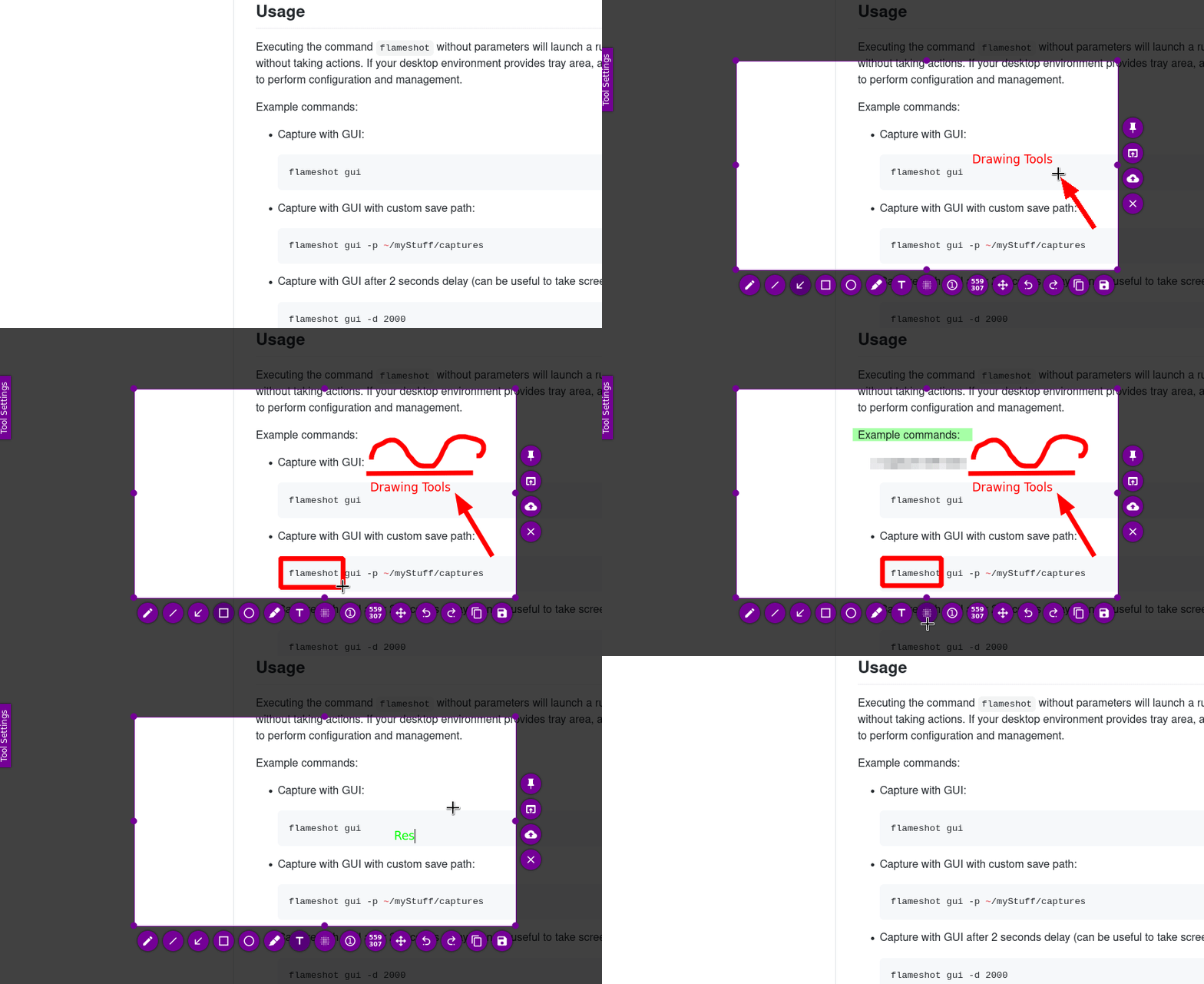
Images from the project's own README.
What it does
Flameshot is a screenshot tool that lets you select part of your screen and immediately draw arrows, add text, blur private details and copy or save the result.
Who it's for
Anyone who shares screenshots for work, support or school.
Key features
- Annotate right after capturing
- Blur and highlight tools
- Customizable shortcuts
Often used instead of: Snagit, CleanShot X
Compatibility
NOVI never presents a guess as verified.- WindowsEvidence-supported
Available as an official WinGet package (“Flameshot.Flameshot”).
- macOS (Apple Silicon)Evidence-supported
The official release v15.0.0 includes “Flameshot-15.0.0-macos-arm64.dmg”.
- macOS (Intel)Evidence-supported
The official release v15.0.0 includes “Flameshot-15.0.0-macos-intel.dmg”.
- LinuxEvidence-supported
Available as an official Flatpak (Flathub) package (“org.flameshot.Flameshot”).
What do these labels mean?
- Confirmed
- NOVI users have completed verified installations on this system.
- Evidence-supported
- The project publishes an official build or package for this system.
- Inferred
- Likely to work based on how the project is built, but not confirmed.
- Unknown
- We have not found enough evidence either way.
- Unsupported
- The project does not support this system.
How to get it
Direct downloadDownload the official installer from the project or its publisher, then open it. Difficulty: Easy.
WindowsDirect downloadGuided
Download from the official release
File attached to the project's official GitHub release. NOVI links to it; the file comes straight from github.com, not from NOVI. Where this link comes from
- 1
After it downloads. Open the downloaded file (usually in your Downloads folder) and follow the installer. If Windows SmartScreen warns you, check that the file came from the address shown above before choosing to run it.
Install with WinGet
Installs Windows applications using WinGet, Microsoft's package manager included with Windows 10 and 11. You run these steps yourself; NOVI does not install anything from this website.
- 1
Open Windows Terminal or PowerShell. Right-click the Start button and choose Terminal. WinGet is included with Windows 10 (recent updates) and Windows 11; type “winget --version” to check.
- 2
Copy this command and press Enter. It installs the package from Microsoft's official WinGet catalogue. Windows may ask for administrator approval for some installers; only approve it if you trust this software.
winget install --id Flameshot.Flameshot --exact --source winget --accept-package-agreements --accept-source-agreements - 3
Check it worked. The app appears in your Start menu. This command lists it as installed:
winget list --id Flameshot.Flameshot --exact --source winget - 4
See the official package listing. Shows the publisher's installer that WinGet downloads. Open
macOS (Apple Silicon)Direct download
Download from the official release
File attached to the project's official GitHub release. NOVI links to it; the file comes straight from github.com, not from NOVI. Where this link comes from
- 1
After it downloads. Open the downloaded file from your Downloads folder. For a .dmg, drag the app into Applications; for a .zip, double-click to unpack it, then move the app into Applications. The first time you open it, macOS may ask you to confirm.
macOS (Intel)Direct download
Download from the official release
File attached to the project's official GitHub release. NOVI links to it; the file comes straight from github.com, not from NOVI. Where this link comes from
- 1
After it downloads. Open the downloaded file from your Downloads folder. For a .dmg, drag the app into Applications; for a .zip, double-click to unpack it, then move the app into Applications. The first time you open it, macOS may ask you to confirm.
LinuxDirect downloadGuided
Get it from Flathub
Flathub is the official app store for Linux Flatpak apps. NOVI links to it; the file comes straight from flathub.org, not from NOVI. Where this link comes from
- 1
After it downloads. Open the downloaded file with your software centre, or follow the project's instructions for this file type (AppImage files need to be marked as executable first).
Install with Flatpak (Flathub)
Installs sandboxed Linux applications from Flathub for your user account only. You run these steps yourself; NOVI does not install anything from this website.
- 1
Make sure Flatpak and Flathub are set up. Many Linux systems include Flatpak. Flathub's setup page has short instructions for every major distribution. Open
- 2
Copy this command into a terminal and press Enter. It installs the app from Flathub for your user account only — no administrator password needed — and runs it in Flatpak's sandbox.
flatpak install --user flathub org.flameshot.Flameshot - 3
Check it worked. The app appears in your applications menu. This command shows its details:
flatpak info --user org.flameshot.Flameshot - 4
See the official Flathub page. Shows the app's permissions and who publishes it. Open
NOVI never installs software from your browser. Downloads come directly from the project or its publisher. Only install software you trust.
Get it working
A free, personal setup plan for your computer: the official download, exact steps, and a checklist. Saved in your dashboard, with help if you get stuck. NOVI never installs or runs anything on your computer.
Requirements
- WinGet for automatic install — Installs Windows applications using WinGet, Microsoft's package manager included with Windows 10 and 11. The NOVI companion checks whether it is present.
- Flatpak (Flathub) for automatic install — Installs sandboxed Linux applications from Flathub for your user account only. The NOVI companion checks whether it is present.
Trust and security
- license
Published under the GNU General Public License v3.0 (GPL-3.0).
Licence detected by GitHub from the repository's licence file. Read the full licence before modifying or redistributing.
Source - distribution
Distributed through WinGet, an established package source.
The package manager checks downloads against a published checksum before installing.
Source - distribution
Distributed through Flatpak (Flathub), an established package source.
The package manager checks downloads against a published checksum before installing.
Source
NOVI checks licences, maintenance activity and distribution sources. NOVI has not audited this project's code and does not certify it as secure. Only install software you trust.
Reviews
No reviews yet
Be the first to share your experience with Flameshot. NOVI never shows invented reviews.
Sign in to write a review.
Recent releases
From GitHubv15.0.0Nov 7, 2026
# What's Changed ## New Features * Let the GUI colors be choosen via hex values by @IndolikarQuantifier in https://github.com/flameshot-org/flameshot/pull/4738 * Add arrow style selector by @serebryakov02 in https://github.com/flameshot-org/flameshot/pull/4769 * Increment/decrement circle counter on mouse wheel by @milnadar in https://github.com/flameshot-org/flameshot/pull/4698 * Add keyboard controls to monitor selector by @serebryakov02 in https://github.com/flameshot-org/flameshot/pull/4811 * Fall back to native X11 capture when the portal is unavailable by @jmcarthur in https://github.com/flameshot-org/flameshot/pull/4827 * Add option to disable the Circle Counter outline by @bekirsoylu in https://github.com/flameshot-org/flameshot/pull/4882 * Removed the close on double click on pinned captures and moved it to shortcut which is configurable through config by @IndolikarQuantifier in https://github.com/flameshot-org/flameshot/pull/4993 * add more desktop terminal emulators to TerminalLauncher by @anushTikoo in https://github.com/flameshot-org/flameshot/pull/5010 * Make the UI language picker a filterable search box by @nicitaacom in https://github.com/flameshot-org/flameshot/pu
Full release notesv15.0.rc1Pre-releaseSep 19, 2026
## What's Changed Minor feature updates and fixing some vulnerabilities that were reported. Planning to have a short beta period. I uploaded the binaries in a rush so the names may be slightly off. * update donation info in docs/CONTRIBUTING.md by @mmahmoudian in https://github.com/flameshot-org/flameshot/pull/4728 * Document hyprland usage by @pol-rivero in https://github.com/flameshot-org/flameshot/pull/4734 * Simplify Hyprland example by @pol-rivero in https://github.com/flameshot-org/flameshot/pull/4741 * Fix capture when logical min/max coordinates are not zero by @rs-pro0 in https://github.com/flameshot-org/flameshot/pull/4735 * add SECURITY.md by @mmahmoudian in https://github.com/flameshot-org/flameshot/pull/4726 * remove the legacy argument parsing for region argument by @mmahmoudian in https://github.com/flameshot-org/flameshot/pull/4761 * Let the GUI colors be choosen via hex values by @IndolikarQuantifier in https://github.com/flameshot-org/flameshot/pull/4738 * Remove deprecated msg and added error message by @borgmanJeremy in https://github.com/flameshot-org/flameshot/pull/4778 * ci: update linux distro build matrix by @holazt in https://github.com/flameshot-org/fl
Full release notesv14.0.0Jun 19, 2026
# Flameshot v14.0 Release Notes This release brings major improvements to multi-monitor support, fractional scaling support, new capture workflows, and a long list of bug fixes across all platforms. --- ## New Features ### Unified Approach to Multi-Monitor / Scaling The largest change in this version is when a screenshot is taken, the user will be prompted to select which monitor to capture. Previously on Linux and Windows the capture widget was drawn across all monitors. This presents significant challenges as we diversify the DE's that are supported in linux and mixed scaling becomes more common. After a lot of testing and iteration I decided the best path forward is this solution. I understand this is a change in workflow, and some may find it cumbersome. However, this will be the path forward for the time being. Please read the following sections as well if you are on X11 or Windows. Additionally, on Linux the primary way to take a screenshot is using the xdg-desktop-portal calls. This is the only way to screenshot on Wayland, and many X11 DE's also support this. I reccomend looking at this [Arch Wiki page](https://wiki.archlinux.org/title/XDG_Desktop_Portal) to see if y
Full release notesv14.0.rc3Pre-releaseJun 1, 2026
This is hopefully the final beta before the v14 release. This is largely a set of bug fixes from the rc1 beta. (RC2 never was published just tagged). ## What's Changed * Translations update from Hosted Weblate by @weblate in https://github.com/flameshot-org/flameshot/pull/4612 * Translations update from Hosted Weblate by @weblate in https://github.com/flameshot-org/flameshot/pull/4619 * Fix pin position on Windows for scaled screen by @ElTh0r0 in https://github.com/flameshot-org/flameshot/pull/4614 * Cmake Analyzers by @ElTh0r0 in https://github.com/flameshot-org/flameshot/pull/4613 * Translations update from Hosted Weblate by @weblate in https://github.com/flameshot-org/flameshot/pull/4632 * fix(macos): prevent config tab content from rendering behind tab bar by @Mitnitsky in https://github.com/flameshot-org/flameshot/pull/4627 * fix(macos): use CGRequestScreenCaptureAccess instead of grabWindow for permission request by @Mitnitsky in https://github.com/flameshot-org/flameshot/pull/4617 * Fix KDE Plasma keyboard shortcut config file by @ElTh0r0 in https://github.com/flameshot-org/flameshot/pull/4637 * fix(macos): fix clipboard copy failing from tray and GUI by @Mitnitsky in http
Full release notesv14.0.rc1Pre-releaseApr 6, 2026
# Flameshot v14.0 RC1 Release Notes We are excited to start the beta for Flameshot version 14. This release brings major improvements to multi-monitor support, fractionl scaling support, new capture workflows, and a long list of bug fixes across all platforms. --- ## New Features ### Unified Approach to Multi-Monitor / Scaling The largest change in this version is when a screenshot is taken, the user will be prompted to select which monitor to capture. Previously on Linux and Windows the capture widget was drawn across all monitors. This presents significant challenges as we diversify the DE's that are supported in linux and mixed scaling becomes more common. After a lot of testing and iteration I decided the best path forward is this solution. I understand this is a change in workflow, and some may find it cumbersome. However, this will be the path forward for the time being. Please read the following sections as well if you are on X11 or Windows. Additionally, on Linux the primary way to take a screenshot is using the xdg-desktop-portal calls. This is the only way to screenshot on Wayland, and many X11 DE's also support this. I reccomend looking at this [Arch Wiki page](ht
Full release notes
Where this information comes from
- Description, audience and features: Written by NOVI editors from the project's README and official website. link
- Statistics, licence and releases: GitHub API link
- Available through WinGet: Official package registry link
- Available through Flatpak (Flathub): Official package registry link
- Direct download links: Files attached to the project's official GitHub release v15.0.0 link
GitHub data last refreshed 3 days ago. Flameshot is the property of its authors. NOVI is not affiliated with this project.


