Uptime Kuma
Know the moment your website goes down
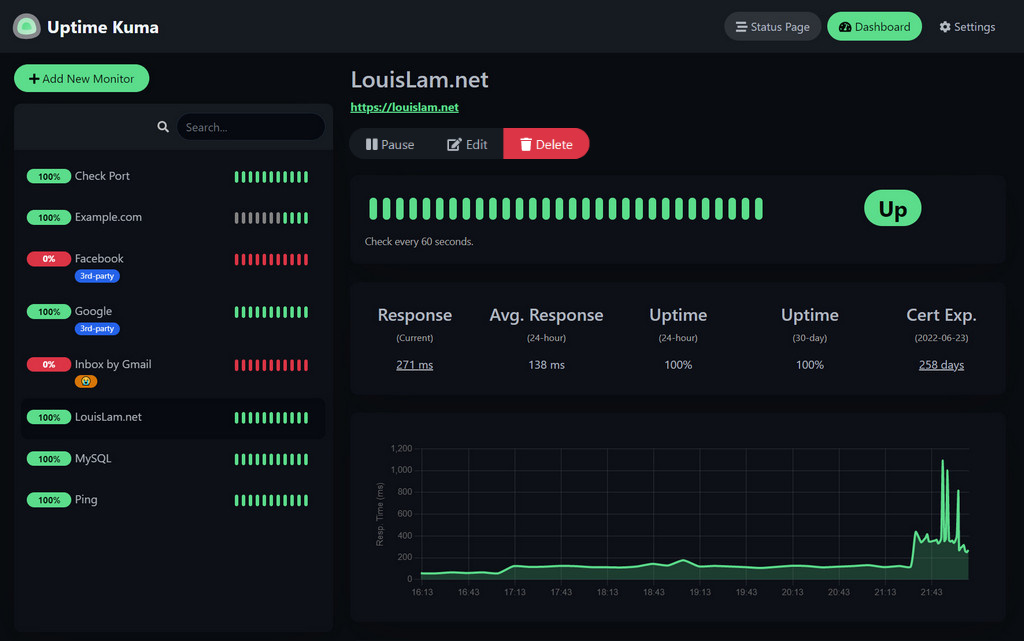
Images from the project's own README.
What it does
Uptime Kuma checks your websites and services at regular intervals and alerts you if something stops responding. It includes attractive status pages you can share.
Who it's for
Website owners and anyone running online services.
Key features
- Monitors websites and services
- Alerts via email, chat apps and more
- Public status pages
Often used instead of: UptimeRobot, Pingdom
Compatibility
NOVI never presents a guess as verified.- WindowsInferred
Runs in Docker, which is available for this system. Not separately confirmed by the project for desktop use.
- macOS (Apple Silicon)Inferred
Runs in Docker, which is available for this system. Not separately confirmed by the project for desktop use.
- macOS (Intel)Inferred
Runs in Docker, which is available for this system. Not separately confirmed by the project for desktop use.
- LinuxEvidence-supported
The project documents a Docker-based installation for Linux servers.
What do these labels mean?
- Confirmed
- NOVI users have completed verified installations on this system.
- Evidence-supported
- The project publishes an official build or package for this system.
- Inferred
- Likely to work based on how the project is built, but not confirmed.
- Unknown
- We have not found enough evidence either way.
- Unsupported
- The project does not support this system.
How to get it
Guided installationNOVI walks you through the official installation steps, one at a time. Difficulty: Advanced.
WindowsAdvanced
Self-host with Docker
For technical users: this runs the software on your own computer or server.
macOS (Apple Silicon)Advanced
Self-host with Docker
For technical users: this runs the software on your own computer or server.
macOS (Intel)Advanced
Self-host with Docker
For technical users: this runs the software on your own computer or server.
LinuxAdvanced
Self-host with Docker
For technical users: this runs the software on your own computer or server.
NOVI never installs software from your browser. Downloads come directly from the project or its publisher. Only install software you trust.
Get it working
A free, personal setup plan for your computer: the official download, exact steps, and a checklist. Saved in your dashboard, with help if you get stuck. NOVI never installs or runs anything on your computer.
Requirements
- Docker — Needed to run the project's official container images.
Trust and security
- license
Published under the MIT License (MIT).
Licence detected by GitHub from the repository's licence file. Read the full licence before modifying or redistributing.
Source
NOVI checks licences, maintenance activity and distribution sources. NOVI has not audited this project's code and does not certify it as secure. Only install software you trust.
Reviews
No reviews yet
Be the first to share your experience with Uptime Kuma. NOVI never shows invented reviews.
Sign in to write a review.
Recent releases
From GitHub2.5.11Nov 12, 2026
### ⬆️ Security Fixes - #8094 chore: Update dependencies - GHSA-437w-j82f-9vjh fix: [Admin Only] RCE via an upstream package's regression (Details will be revealed after 7 days) (Thanks @Tomer-PL)
Full release notes2.5.10Nov 12, 2026
### 🐞 Bug Fixes - #8138 fix: reset password for embedded MariaDB ### ⬆️ Security Fixes - [Docker] Update Node.js to 22.23.5 - Upstream high severity issues could possibly affect Uptime Kuma (Read more: https://nodejs.org/en/blog/vulnerability/november-2026-security-releases) PS: For non-Docker, you should update your Node.js to the patched version too.
Full release notes2.5.9Oct 31, 2026
### 🐞 Bug Fixes - #8082 fix: runtime timeout fallback used milliseconds for a seconds field - #8081 fix: reset push monitor retries from the last stored heartbeat - #8079 fix: remove duplicated refresh timer on status page - #8064 fix: display recurring maintenance in its configured timezone (Thanks @kuxiaowo) ### ⬆️ Security Fixes - GHSA-86ch-2247-gr56 fix: RSS cache poisoning (Thanks @the-arma-of-owl) - #8080 chore: drop outdated apicache, migrate to http-cache-semantics (related to the above issue) - #8050 chore: Update dependencies
Full release notes2.5.8Oct 26, 2026
### 🐞 Bug Fixes - #8049 fix: Docker verification check sometimes not catching invalid responses (2.5.X backport) (Thanks @Abestanis) - #8038 fix: add `next-slim-rootless` docker tag - #8028 fix: drop TLS support for the TCP Port monitor (It never worked as expected and very buggy, all existing monitors will become normal TCP monitors) ### ⬆️ Security Fixes - GHSA-v2p3-6f5h-6hhf [Admin Only] Authenticated RCE via Apprise CLI Argument Injection (Thanks @Sami111-Afk) ### Others - #8037 revert: hide/show password toggle in login page (#7672) (Because the height is inconsistent)
Full release notes2.5.7Oct 23, 2026
### 🐞 Bug Fixes - #7989 fix: retries ignored by TCP Port monitor with SSL/STARTTLS ### ⬆️ Security Fixes - [Docker] Images bumped to Node.js 22.23.4, now it rejects the leaked eMudhra 384 bit CA: `00:00:00:00:00:00:00:00:00:00:00:00:00:00:00:00:00:00:00:00:00:00:00:00:00:00:00:00:00:00:00:00:00:00:00:00:00:00:00:00:00:00:00:00:00:00:00:04`. (Thanks @veteranbv)
Full release notes
Where this information comes from
- Description, audience and features: Written by NOVI editors from the project's README and official website. link
- Statistics, licence and releases: GitHub API link
GitHub data last refreshed 3 days ago. Uptime Kuma is the property of its authors. NOVI is not affiliated with this project.