Open WebUI
A friendly chat interface for AI models you run yourself
Images from the project's own README.
What it does
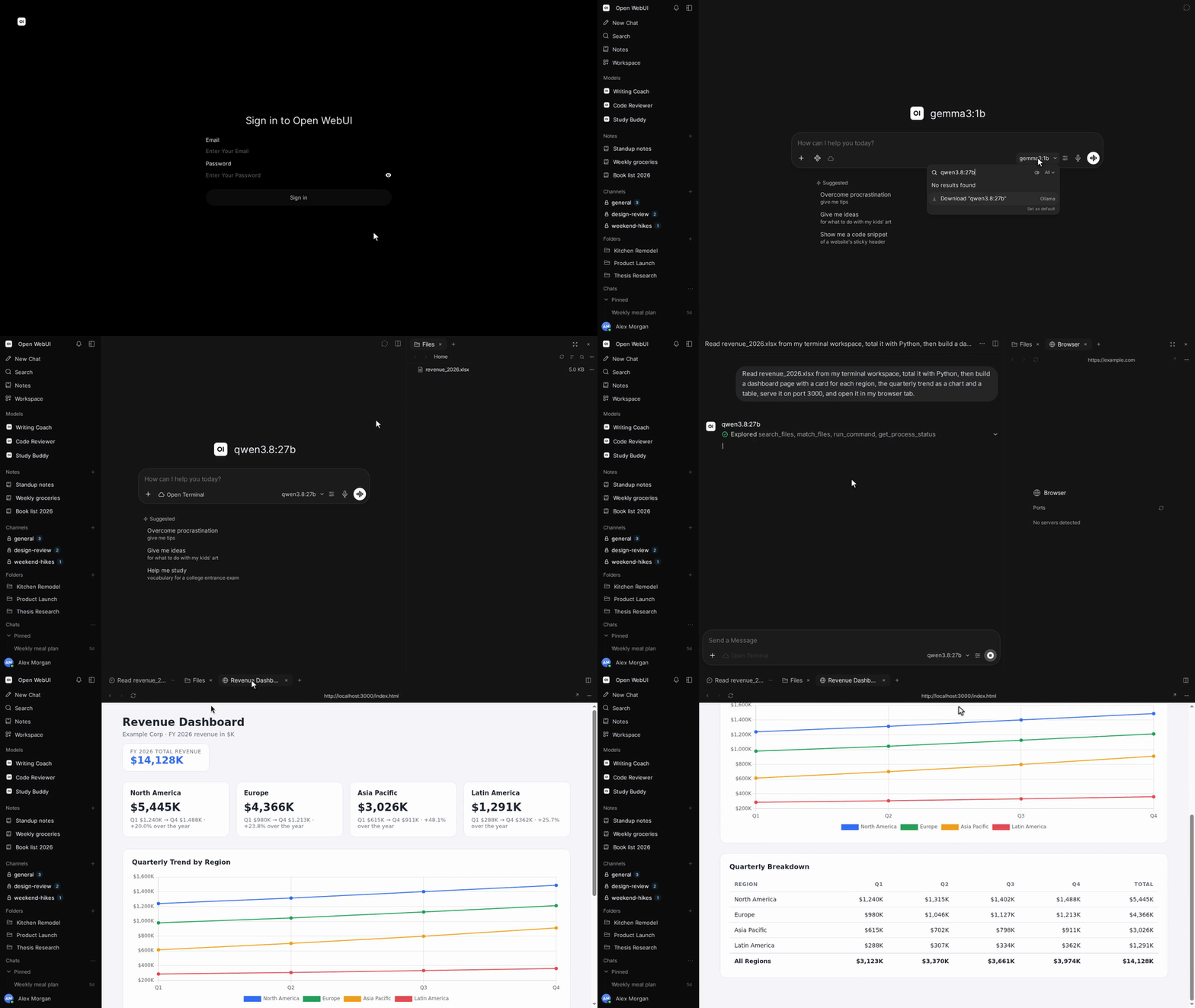
Open WebUI gives you a polished, ChatGPT-style chat window in your browser that talks to AI models running on your own computer or server. It pairs naturally with Ollama.
Who it's for
People already running local AI models who want a nicer place to chat, share with family or a team, and keep conversations private.
Key features
- Familiar chat interface in your browser
- Upload documents and ask questions about them
- Multiple user accounts
Often used instead of: ChatGPT
Compatibility
NOVI never presents a guess as verified.- WindowsInferred
Runs in Docker, which is available for this system. Not separately confirmed by the project for desktop use.
- macOS (Apple Silicon)Inferred
Runs in Docker, which is available for this system. Not separately confirmed by the project for desktop use.
- macOS (Intel)Inferred
Runs in Docker, which is available for this system. Not separately confirmed by the project for desktop use.
- LinuxEvidence-supported
The project documents a Docker-based installation for Linux servers.
What do these labels mean?
- Confirmed
- NOVI users have completed verified installations on this system.
- Evidence-supported
- The project publishes an official build or package for this system.
- Inferred
- Likely to work based on how the project is built, but not confirmed.
- Unknown
- We have not found enough evidence either way.
- Unsupported
- The project does not support this system.
How to get it
Guided installationNOVI walks you through the official installation steps, one at a time. Difficulty: Advanced.
WindowsAdvanced
Self-host with Docker
For technical users: this runs the software on your own computer or server.
macOS (Apple Silicon)Advanced
Self-host with Docker
For technical users: this runs the software on your own computer or server.
macOS (Intel)Advanced
Self-host with Docker
For technical users: this runs the software on your own computer or server.
LinuxAdvanced
Self-host with Docker
For technical users: this runs the software on your own computer or server.
NOVI never installs software from your browser. Downloads come directly from the project or its publisher. Only install software you trust.
Get it working
A free, personal setup plan for your computer: the official download, exact steps, and a checklist. Saved in your dashboard, with help if you get stuck. NOVI never installs or runs anything on your computer.
Requirements
- Docker — Needed to run the project's official container images.
Trust and security
- license
No verified open-source licence.
GitHub could not match this repository to a recognised open-source licence. The code is public, but you should not assume you may modify or redistribute it. Check the repository's licence terms.
Source
NOVI checks licences, maintenance activity and distribution sources. NOVI has not audited this project's code and does not certify it as secure. Only install software you trust.
Reviews
No reviews yet
Be the first to share your experience with Open WebUI. NOVI never shows invented reviews.
Sign in to write a review.
Recent releases
From GitHubv0.13.3Nov 8, 2026
### Added - 🦾 **Agents in automations.** The automation editor now lets you choose a terminal and working folder, then select a coding agent available there. Scheduled runs use that saved terminal and folder, and check that the terminal and agent are still available before starting. Agent automations send their results to a chat; channel destinations remain available for ordinary models. [Commit](https://github.com/open-webui/open-webui/commit/21fc016141c73a0e11b428c61bde20527bbc228a) - 📂 **Change terminal and folder during a chat.** You can now choose a different terminal or working folder after sending messages, including in temporary chats. Both controls remain disabled while a reply is being generated. [Commit](https://github.com/open-webui/open-webui/commit/a518ff1630b74ed6edd62538c5da4bb26cc6dd20) - 🇧🇷 **Brazilian Portuguese translations.** Added missing translations for terminal and folder controls, Git actions, spreadsheet editing, voice notes, tab shortcuts, notification sounds and tool settings. Updated the explanations for document retrieval, tool permissions and voice settings. [#33945](https://github.com/open-webui/open-webui/pull/33945) ### Fixed - 📂 **Files
Full release notesv0.13.2Nov 8, 2026
### Fixed - 🔓 **Chat over plain HTTP.** Opening Open WebUI over plain HTTP at a LAN or Docker address now loads new and existing chats instead of staying on a spinner with "crypto.randomUUID is not a function". [#33919](https://github.com/open-webui/open-webui/issues/33919) - 📝 **Comments and Markdown editing over plain HTTP.** Creating, replying to and editing comments, and editing Markdown files containing rendered blocks such as Mermaid diagrams or callouts, no longer fail with the same UUID error. [Commit](https://github.com/open-webui/open-webui/commit/3c400952cbb30e8eb72652d83b2af2f75a3b9341) - 🎛️ **Side Chat permission switch.** The Allow Side Chat switch is now visible even when Temporary Chat is off, so administrators can configure the two permissions independently. [#33920](https://github.com/open-webui/open-webui/pull/33920)
Full release notesv0.13.1Nov 8, 2026
### Added - 🦾 **Coding agents as models.** On an Open Terminal that offers agents, coding agents such as Claude Code, Codex and Pi now appear in the model picker. You can chat with them or call them by voice, choose their reasoning effort and service tier, and approve their tool requests in the chat. Each conversation uses one agent, and agent chats cannot be regenerated, continued or edited and resent. If an agent's terminal goes away, its chats and new chats fall back to the default model and earlier replies keep the agent's name. Autocompletion in agent chats uses the task model, or is skipped when there is none. [#33843](https://github.com/open-webui/open-webui/pull/33843), [#33860](https://github.com/open-webui/open-webui/pull/33860), [#33880](https://github.com/open-webui/open-webui/pull/33880), [#33857](https://github.com/open-webui/open-webui/pull/33857) - 🪢 **Introducing Tether.** [Tether](https://github.com/open-webui/tether) is the new desktop companion app for macOS, Windows and Linux that ties your own computer to Open WebUI. Sign in once and your computer shows up under Your devices in the terminal menu, so models, coding agents and automations can work in your re
Full release notesv0.13.0Nov 3, 2026
### Added - 📑 **Tabbed workspace.** The Tabs button at the top of a chat now opens a workspace for files, multiple terminal sessions, artifacts, previews, voice calls and comments. Add tabs from the + menu, drag to reorder them, and create and save new files directly into the selected terminal. Keep the conversation and its working files together while coding, analyzing data or reviewing generated documents. [Commit](https://github.com/open-webui/open-webui/commit/2d7cf5ec99c3fa5c7ee48b91823fb8021b846cf3), [Commit](https://github.com/open-webui/open-webui/commit/5b58b1ebc03024fca1efd498aeabe4d9880dc3aa), [Commit](https://github.com/open-webui/open-webui/commit/a06aa230f75cc2d3512d1bca197a98f3c35da96f), [Commit](https://github.com/open-webui/open-webui/commit/cdc6feecd3769aac41844d81bd775dfb69b44912) - 🖥️ **Open Terminal Desktop tab for computer use.** Open the Desktop tab from the + menu to view and control the desktop provided by your connected Open Terminal, with mouse, keyboard, clipboard and audio support where available. With a model that can call its desktop tools, you can follow computer-use workflows in the same desktop and step in yourself: operate graphical apps, insp
Full release notesv0.12.5Oct 29, 2026
### Added - 🧭 **Analytics session explorer.** Administrators can now open a Sessions tab in Admin Analytics that lists each chat with its tokens, responses, errors and time span, filters them by search, model, token range or sub-agents, and shows a chat's saved replies and tool calls with their timing and outcome, as long as "ENABLE_ADMIN_CHAT_ACCESS" is on. [Commit](https://github.com/open-webui/open-webui/commit/7b303cf496f22d665ff1f1013a2308de0d74a7a4) - 📑 **Pages in notes.** Notes can now hold several pages and subpages, which you can add, rename, reorder, move under another page, download, link to and delete from the page tabs, and search results and the model now work with notes page by page. [Commit](https://github.com/open-webui/open-webui/commit/b34885efc639c10cbf06c35cd2d4ff6055e36b45) - 👀 **Live presence in notes.** A note now shows who else has it open, and clicking a person jumps to the page and spot they are working on. [Commit](https://github.com/open-webui/open-webui/commit/e3ad014fb250c663a124ada0046c4017b85aabd6) - ✏️ **Rename from chat menu.** The menu next to an open chat's title now has Rename, which turns the title at the top of the page into a text box,
Full release notes
Where this information comes from
- Description, audience and features: Written by NOVI editors from the project's README and official website. link
- Statistics, licence and releases: GitHub API link
GitHub data last refreshed 3 days ago. Open WebUI is the property of its authors. NOVI is not affiliated with this project.