LosslessCut
Trim and join videos instantly with no quality loss
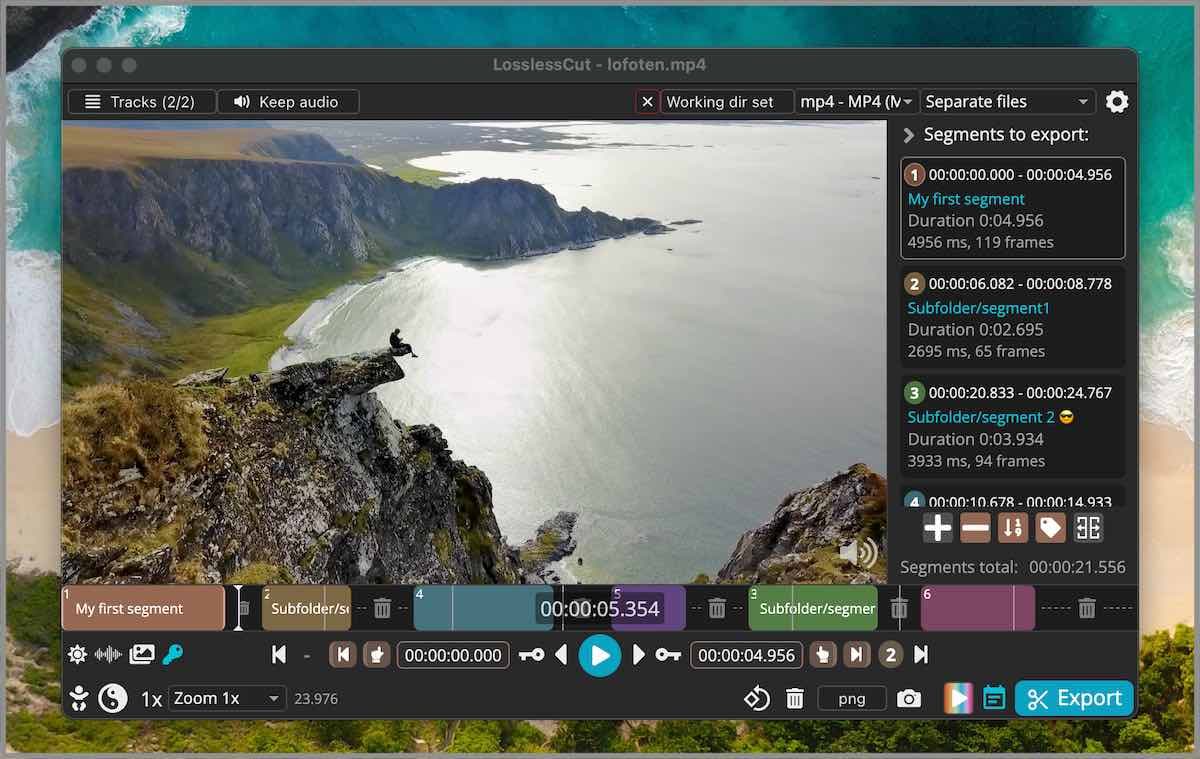
Images from the project's own README.
What it does
LosslessCut cuts out the parts of a video or audio file you want, or joins clips together, without re-encoding. That makes it very fast and keeps the original quality.
Who it's for
People who just need to trim recordings quickly.
Key features
- Cut without re-encoding
- Merge clips
- Extract audio or individual tracks
Compatibility
NOVI never presents a guess as verified.- WindowsEvidence-supported
The official release v3.70.2 includes “LosslessCut-win-arm64-DONT-USE-THIS-FILE.appx”.
- macOS (Apple Silicon)Evidence-supported
Available as an official Homebrew Cask package (“losslesscut”).
- macOS (Intel)Evidence-supported
Available as an official Homebrew Cask package (“losslesscut”).
- LinuxEvidence-supported
Available as an official Flatpak (Flathub) package (“no.mifi.losslesscut”).
What do these labels mean?
- Confirmed
- NOVI users have completed verified installations on this system.
- Evidence-supported
- The project publishes an official build or package for this system.
- Inferred
- Likely to work based on how the project is built, but not confirmed.
- Unknown
- We have not found enough evidence either way.
- Unsupported
- The project does not support this system.
How to get it
Direct downloadDownload the official installer from the project or its publisher, then open it. Difficulty: Easy.
WindowsDirect download
Download from the official release
File attached to the project's official GitHub release. NOVI links to it; the file comes straight from github.com, not from NOVI. Where this link comes from
- 1
After it downloads. Open the downloaded file (usually in your Downloads folder) and follow the installer. If Windows SmartScreen warns you, check that the file came from the address shown above before choosing to run it.
macOS (Apple Silicon)Direct downloadGuided
Download from the official release
File attached to the project's official GitHub release. NOVI links to it; the file comes straight from github.com, not from NOVI. Where this link comes from
- 1
After it downloads. Open the downloaded file from your Downloads folder. For a .dmg, drag the app into Applications; for a .zip, double-click to unpack it, then move the app into Applications. The first time you open it, macOS may ask you to confirm.
Install with Homebrew Cask
Installs macOS applications using Homebrew, a widely used package manager for macOS. You run these steps yourself; NOVI does not install anything from this website.
- 1
Make sure Homebrew is installed. Homebrew is a free, widely used tool for installing software on a Mac. Open the Terminal app and type “brew --version”. If you see a version number you already have it; otherwise follow the one-line instructions on brew.sh. Open
- 2
Copy this command into Terminal and press Return. It installs the package from Homebrew's official catalogue only. Homebrew checks the download against a known checksum.
brew install --cask homebrew/cask/losslesscut - 3
Check it worked. The app appears in your Applications folder. You can also run this command to see the installed version:
brew list --cask --versions losslesscut - 4
See the official package listing. Shows exactly what Homebrew installs and where it comes from. Open
macOS (Intel)Direct downloadGuided
Download from the official release
File attached to the project's official GitHub release. NOVI links to it; the file comes straight from github.com, not from NOVI. Where this link comes from
- 1
After it downloads. Open the downloaded file from your Downloads folder. For a .dmg, drag the app into Applications; for a .zip, double-click to unpack it, then move the app into Applications. The first time you open it, macOS may ask you to confirm.
Install with Homebrew Cask
Installs macOS applications using Homebrew, a widely used package manager for macOS. You run these steps yourself; NOVI does not install anything from this website.
- 1
Make sure Homebrew is installed. Homebrew is a free, widely used tool for installing software on a Mac. Open the Terminal app and type “brew --version”. If you see a version number you already have it; otherwise follow the one-line instructions on brew.sh. Open
- 2
Copy this command into Terminal and press Return. It installs the package from Homebrew's official catalogue only. Homebrew checks the download against a known checksum.
brew install --cask homebrew/cask/losslesscut - 3
Check it worked. The app appears in your Applications folder. You can also run this command to see the installed version:
brew list --cask --versions losslesscut - 4
See the official package listing. Shows exactly what Homebrew installs and where it comes from. Open
LinuxDirect downloadGuided
Download from the official release
File attached to the project's official GitHub release. NOVI links to it; the file comes straight from github.com, not from NOVI. Where this link comes from
- 1
After it downloads. Open the downloaded file with your software centre, or follow the project's instructions for this file type (AppImage files need to be marked as executable first).
Install with Flatpak (Flathub)
Installs sandboxed Linux applications from Flathub for your user account only. You run these steps yourself; NOVI does not install anything from this website.
- 1
Make sure Flatpak and Flathub are set up. Many Linux systems include Flatpak. Flathub's setup page has short instructions for every major distribution. Open
- 2
Copy this command into a terminal and press Enter. It installs the app from Flathub for your user account only — no administrator password needed — and runs it in Flatpak's sandbox.
flatpak install --user flathub no.mifi.losslesscut - 3
Check it worked. The app appears in your applications menu. This command shows its details:
flatpak info --user no.mifi.losslesscut - 4
See the official Flathub page. Shows the app's permissions and who publishes it. Open
NOVI never installs software from your browser. Downloads come directly from the project or its publisher. Only install software you trust.
Get it working
A free, personal setup plan for your computer: the official download, exact steps, and a checklist. Saved in your dashboard, with help if you get stuck. NOVI never installs or runs anything on your computer.
Requirements
- macOS 12 or later — Minimum macOS version declared by the Homebrew package.
- Homebrew Cask for automatic install — Installs macOS applications using Homebrew, a widely used package manager for macOS. The NOVI companion checks whether it is present.
- Flatpak (Flathub) for automatic install — Installs sandboxed Linux applications from Flathub for your user account only. The NOVI companion checks whether it is present.
Trust and security
- license
Published under the GNU General Public License v2.0 (GPL-2.0).
Licence detected by GitHub from the repository's licence file. Read the full licence before modifying or redistributing.
Source - distribution
Distributed through Homebrew Cask, an established package source.
The package manager checks downloads against a published checksum before installing.
Source - distribution
Distributed through Flatpak (Flathub), an established package source.
The package manager checks downloads against a published checksum before installing.
Source
NOVI checks licences, maintenance activity and distribution sources. NOVI has not audited this project's code and does not certify it as secure. Only install software you trust.
Reviews
No reviews yet
Be the first to share your experience with LosslessCut. NOVI never shows invented reviews.
Sign in to write a review.
Recent releases
From GitHubv3.70.2Oct 28, 2026
- (Windows) Fix detecting silent and black scenes, which found nothing in 3.70.0 and 3.70.1 #3174 #3178 - Fix extracting attachments showing an error even though they were extracted, and a warning about unprocessable streams when exporting files with attachments - (Linux) The arm64 build now includes FFmpeg - (Linux) Docks show LosslessCut's own icon for the AppImage when its launcher is installed under another name, e.g. by AppImageLauncher #3172 - Help links open the documentation on losslesscut.app, and the Discord link in the error report dialog now opens Discord See [3.70.0](https://github.com/mifi/lossless-cut/releases/tag/v3.70.0) for the full list of changes.
Full release notesv3.70.1Oct 19, 2026
- (Windows) Fix FFmpeg missing from the x64 build #3147 See [3.70.0](https://github.com/mifi/lossless-cut/releases/tag/v3.70.0) for the full list of changes.
Full release notesv3.70.0Pre-releaseOct 19, 2026
‼️ Note: this version has a bug where the Windows x64 ffmpeg.exe file is missing. Please use next version instead. - Upgrade bundled FFmpeg to 8.1 (fixes CVE-2026-8461) #2943 #3139 - New "Theme" setting (System default / Dark / Light) - LosslessCut can now follow the OS dark/light theme #3113 - Metadata editor improvements #3135 #3136 #3140 #3141 - Copy track or file metadata from another track or another loaded file with the new "Copy from" menu - Apply a track metadata value (e.g. `language`) to all other tracks of the same type with one click - Edited tracks and files are now highlighted in the tracks dialog, and changes can be reset per track, per file or all at once - Suggestions for common codec tags (e.g. `hvc1` for Apple compatibility), language codes and metadata keys (`title`, `language`, `handler_name`), with warnings for invalid values - "Now" button for `creation_time`, multi-line editing for `comment`/`description`, Esc to cancel an edit, and a notice when MP4/MOV may drop custom keys - Export dialog warns when an HEVC track will lack the `hvc1` tag needed for Apple devices - New setting "Video preview scaling" (advanced), e.g. to not upscale small videos
Full release notesv3.69.0Jun 4, 2026
Warning: - Windows arm64 version is missing ffmpeg.exe - please use nightly build instead for Windows ARM. - There is a bug when changing files while playing back where playback continues in the background, please use latest nightly build instead if you're experiencing this issue. [#2907](https://github.com/mifi/lossless-cut/issues/2907) Release notes: - Add lossless cropping & aspect ratio override via bitstream and container metadata #643 - Alow shifting tracks for each file (`-itsoffset`) #216 - Add "decimate video" tool to filter away all non-keyframes #2111 - Add Windows ARM 64 native build with native ffmpeg - Move timecode out of timeline and make it copy-able #2592 #2691 #2800 #483 #2808 - Upgrade Electron to latest - Add new "opposing" align mode #2654 - Add FFmpeg `-hwaccel auto` setting for hardware acceleration of certain operations - Add API events `export-start` and `export-complete` - Allow deleting track metadata #2819 - Improve shift segments dialog #2839 - Show keyboard shortcuts inside button tooltips in UI - Warn if trying to cut with too few keyframes around cutpoint #516 #2780 #2756 - (Linux) include app name in notification #2794 - Pull latest translations
Full release notesv3.68.0Jan 29, 2026
⚠️ **Warning:** The keyboard handling has changed as of v3.67.0 and later. If you after upgrading to this version ever revert to a version prior to v3.67.0, you **will lose your keyboard bindings**. Also there's an issue with migrating certain shortcuts with some keyboard layouts to the new version. See [TLDR here.](https://github.com/mifi/lossless-cut/issues/2671#issuecomment-3727638311) Note: there's a bug with the [app size of this version being larger](https://github.com/mifi/lossless-cut/issues/2736). Note: LosslessCut-win-x64.appx and LosslessCut-mac-universal.pkg are for the App Stores and **cannot be used**. - Changed: Invert scroll zoom direction #2703 - Changed: `toggleStripAll` action to not invert selection - instead actually toggle all on/off - New setting: When opening a new file, ask about import chapters: "Always", "never" or "ask" #2699 - Add "Copy to clipboard and close" button for YouTube chapters #2675 - Add new keyboard actions for existing functions #2699 - `selectSegmentsByLabel` - `selectSegmentsByExpr` - `labelSelectedSegments` - `mutateSegmentsByExpr` - Add new template variable `FILES` for all templates. It is a list of `SourceFile` objects. #2
Full release notes
Where this information comes from
- Description, audience and features: Written by NOVI editors from the project's README and official website. link
- Statistics, licence and releases: GitHub API link
- Available through Homebrew Cask: Official package registry link
- Available through Flatpak (Flathub): Official package registry link
- Direct download links: Files attached to the project's official GitHub release v3.70.2 link
GitHub data last refreshed 3 days ago. LosslessCut is the property of its authors. NOVI is not affiliated with this project.