darktable
Develop and organize RAW photos like a pro

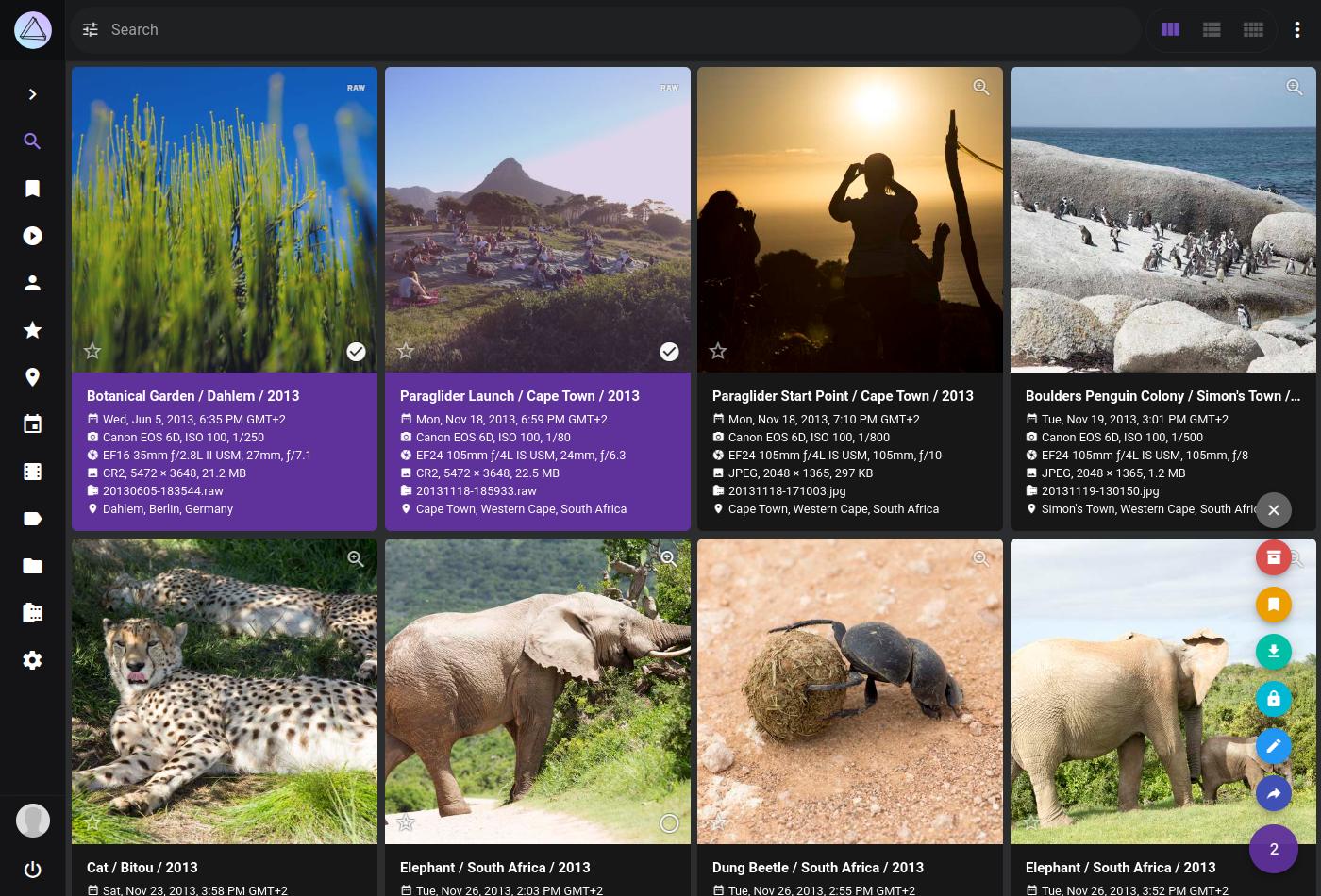
Images from the project's own README.
What it does
darktable is a photography workflow app for managing and editing RAW photos. Edits are non-destructive, so your original files are never changed.
Who it's for
Hobbyist and professional photographers looking for a free alternative to subscription photo editors.
Key features
- Non-destructive RAW editing
- Photo library with tags and ratings
- Professional colour tools
Often used instead of: Adobe Lightroom, Capture One
Compatibility
NOVI never presents a guess as verified.- WindowsEvidence-supported
Available as an official WinGet package (“darktable.darktable”).
- macOS (Apple Silicon)Evidence-supported
The official release release-5.6.2 includes “darktable-5.6.2-arm64.dmg”.
- macOS (Intel)Unknown
No official build, package or documentation for this system was found.
- LinuxEvidence-supported
Available as an official Flatpak (Flathub) package (“org.darktable.Darktable”).
What do these labels mean?
- Confirmed
- NOVI users have completed verified installations on this system.
- Evidence-supported
- The project publishes an official build or package for this system.
- Inferred
- Likely to work based on how the project is built, but not confirmed.
- Unknown
- We have not found enough evidence either way.
- Unsupported
- The project does not support this system.
How to get it
Direct downloadDownload the official installer from the project or its publisher, then open it. Difficulty: Easy.
WindowsDirect downloadGuided
Download from the official release
File attached to the project's official GitHub release. NOVI links to it; the file comes straight from github.com, not from NOVI. Where this link comes from
- 1
After it downloads. Open the downloaded file (usually in your Downloads folder) and follow the installer. If Windows SmartScreen warns you, check that the file came from the address shown above before choosing to run it.
Install with WinGet
Installs Windows applications using WinGet, Microsoft's package manager included with Windows 10 and 11. You run these steps yourself; NOVI does not install anything from this website.
- 1
Open Windows Terminal or PowerShell. Right-click the Start button and choose Terminal. WinGet is included with Windows 10 (recent updates) and Windows 11; type “winget --version” to check.
- 2
Copy this command and press Enter. It installs the package from Microsoft's official WinGet catalogue. Windows may ask for administrator approval for some installers; only approve it if you trust this software.
winget install --id darktable.darktable --exact --source winget --accept-package-agreements --accept-source-agreements - 3
Check it worked. The app appears in your Start menu. This command lists it as installed:
winget list --id darktable.darktable --exact --source winget - 4
See the official package listing. Shows the publisher's installer that WinGet downloads. Open
macOS (Apple Silicon)Direct download
Download from the official release
File attached to the project's official GitHub release. NOVI links to it; the file comes straight from github.com, not from NOVI. Where this link comes from
- 1
After it downloads. Open the downloaded file from your Downloads folder. For a .dmg, drag the app into Applications; for a .zip, double-click to unpack it, then move the app into Applications. The first time you open it, macOS may ask you to confirm.
LinuxDirect downloadGuided
Download from the official release
File attached to the project's official GitHub release. NOVI links to it; the file comes straight from github.com, not from NOVI. Where this link comes from
- 1
After it downloads. Open the downloaded file with your software centre, or follow the project's instructions for this file type (AppImage files need to be marked as executable first).
Install with Flatpak (Flathub)
Installs sandboxed Linux applications from Flathub for your user account only. You run these steps yourself; NOVI does not install anything from this website.
- 1
Make sure Flatpak and Flathub are set up. Many Linux systems include Flatpak. Flathub's setup page has short instructions for every major distribution. Open
- 2
Copy this command into a terminal and press Enter. It installs the app from Flathub for your user account only — no administrator password needed — and runs it in Flatpak's sandbox.
flatpak install --user flathub org.darktable.Darktable - 3
Check it worked. The app appears in your applications menu. This command shows its details:
flatpak info --user org.darktable.Darktable - 4
See the official Flathub page. Shows the app's permissions and who publishes it. Open
NOVI never installs software from your browser. Downloads come directly from the project or its publisher. Only install software you trust.
Get it working
A free, personal setup plan for your computer: the official download, exact steps, and a checklist. Saved in your dashboard, with help if you get stuck. NOVI never installs or runs anything on your computer.
Requirements
- WinGet for automatic install — Installs Windows applications using WinGet, Microsoft's package manager included with Windows 10 and 11. The NOVI companion checks whether it is present.
- Flatpak (Flathub) for automatic install — Installs sandboxed Linux applications from Flathub for your user account only. The NOVI companion checks whether it is present.
Trust and security
- license
Published under the GNU General Public License v3.0 (GPL-3.0).
Licence detected by GitHub from the repository's licence file. Read the full licence before modifying or redistributing.
Source - distribution
Distributed through WinGet, an established package source.
The package manager checks downloads against a published checksum before installing.
Source - distribution
Distributed through Flatpak (Flathub), an established package source.
The package manager checks downloads against a published checksum before installing.
Source
NOVI checks licences, maintenance activity and distribution sources. NOVI has not audited this project's code and does not certify it as secure. Only install software you trust.
Reviews
No reviews yet
Be the first to share your experience with darktable. NOVI never shows invented reviews.
Sign in to write a review.
Recent releases
From GitHubnightlyPre-releaseNov 16, 2026
This is a nightly build of Darktable. You can use this if you want to try new features without waiting for releases. From time to time, in development builds, old difficult-to-reproduce bugs are fixed, but it is also true that in the development process with the introduction of new complex code, the stability of the program may suffer compared to official releases, so **use it with caution**! Also, new versions can make changes to the database schema, so it's best to run them with a separate library. We recommended to separate your stable installation from the nightly, see our [guide](https://docs.darktable.org/usermanual/development/en/special-topics/test-environment/) in the manual. The `*-x86_64.AppImage` package is compatible with distribution releases that have glibc version 2.35 or higher. For example, if we consider some popular distributions, Ubuntu 22.04, Debian 12, Fedora 36 and newer releases are compatible. The `*-aarch64.AppImage` package requires glibc 2.39 or higher (e.g. Ubuntu 24.04, Debian 13, Fedora 40 and newer). The `*.AppImage.zsync` file is not intended to be downloaded and used locally. Just ignore it. This file contains technical information required b
Full release notesrelease-5.6.2Oct 4, 2026
We're proud to announce the bug-fix release of darktable, 5.6.2! The github release is here: [https://github.com/darktable-org/darktable/releases/tag/release-5.6.2](https://github.com/darktable-org/darktable/releases/tag/release-5.6.2). To build from source, do not use the autogenerated tarball provided by GitHub on the release page, download our tar.xz file instead. If you're just building for yourself without creating a package for some distribution, then using source code cloning in git is an even more convenient way. The checksums are: ``` $ sha256sum darktable-5.6.2.tar.xz d2da92c670401d350b576431f21e58bee40348e1f5078201a8a1b8c270585834 darktable-5.6.2.tar.xz $ sha256sum darktable-5.6.2-x86_64.AppImage 4b0d1c737a2a18c7d8afb81aa3daaf25930bbe541dda98e6354dabd5c2e4dc36 Darktable-5.6.2-x86_64.AppImage $ sha256sum darktable-5.6.2-aarch64.AppImage 5b8015f8534453cb3bbd6e5a03e362cb7d9d9573f20d3928aadad354df18ad10 Darktable-5.6.2-aarch64.AppImage $ sha256sum darktable-5.6.2-arm64.dmg 6ff88e58a2a59cb07b0a1502fea7205e68cd783380a33a3ce7bda68ec29def0c darktable-5.6.2-arm64.dmg $ sha256sum darktable-5.6.2-win64.exe 7f7a1eabcd0a1b548dcfacac842c8203fc85a4175697fb09f90bb8
Full release notesrelease-5.6.1Aug 27, 2026
We're proud to announce the bug-fix release of darktable, 5.6.1! The github release is here: [https://github.com/darktable-org/darktable/releases/tag/release-5.6.1](https://github.com/darktable-org/darktable/releases/tag/release-5.6.1). To build from source, do not use the autogenerated tarball provided by GitHub on the release page, download our tar.xz file instead. If you're just building for yourself without creating a package for some distribution, then using source code cloning in git is an even more convenient way. The checksums are: ``` $ sha256sum darktable-5.6.1.tar.xz e8b84ac98b0b689a244e4036c4b56394c1d58ce2d9abc05e0a060ef9f756dc36 darktable-5.6.1.tar.xz $ sha256sum darktable-5.6.1-x86_64.AppImage 867ba61fca41d614e6650fd92d6e7968d8c56a1d1dd2bbc3aa06b52508694ed6 Darktable-5.6.1-x86_64.AppImage $ sha256sum darktable-5.6.1-aarch64.AppImage 87088ada0a614c2c61c6bc663249388fe9e1d4b57689de3a5fd98c7af348d75d Darktable-5.6.1-aarch64.AppImage $ sha256sum darktable-5.6.1-x86_64.dmg ab09e11d548a7028f7bacc2bc4549a272c4e8d385be0e38ecc9e7943914abe61 darktable-5.6.1-x86_64.dmg $ sha256sum darktable-5.6.1-arm64.dmg 155c25a48e06023eeeda3640f6f4fc7848bc1ad8e7384ba1d7b6
Full release notesrelease-5.6.0Jun 21, 2026
We're proud to announce the new feature release of darktable, 5.6.0! The github release is here: [https://github.com/darktable-org/darktable/releases/tag/release-5.6.0](https://github.com/darktable-org/darktable/releases/tag/release-5.6.0). To build from source, do not use the autogenerated tarball provided by GitHub on the release page, download our tar.xz file instead. If you're just building for yourself without creating a package for some distribution, then using source code cloning in git is an even more convenient way. The checksums are: ``` $ sha256sum darktable-5.6.0.tar.xz 157d6d3847af8afcabe78944454786f73a886e08a504b4bd6114c2065fe006e4 darktable-5.6.0.tar.xz $ sha256sum darktable-5.6.0-x86_64.AppImage cbad7bf4be2607e1725db156d73c799d267a79fc29a572c3136a5deb9c9be948 Darktable-5.6.0-x86_64.AppImage $ sha256sum darktable-5.6.0-aarch64.AppImage 147943bd2eedc33c8d31eb3e6b87b591ac9ca285d00282b2655d8d19caecfca0 Darktable-5.6.0-aarch64.AppImage $ sha256sum darktable-5.6.0-x86_64.dmg 24c83655af0d81c2f8cb78b97531a03bb6a650349b7fd49c1679080db675cbcb darktable-5.6.0-x86_64.dmg $ sha256sum darktable-5.6.0-arm64.dmg 49aec447e891ab481e436b4c0231fc3c8d0001aad220762ae8e765d3bd
Full release notesrelease-5.4.1Feb 5, 2026
We're proud to announce the bug-fix release of darktable, 5.4.1! The github release is here: [https://github.com/darktable-org/darktable/releases/tag/release-5.4.1](https://github.com/darktable-org/darktable/releases/tag/release-5.4.1). To build from source, do not use the autogenerated tarball provided by GitHub on the release page, download our tar.xz file instead. If you're just building for yourself without creating a package for some distribution, then using source code cloning in git is an even more convenient way. The checksums are: ``` $ sha256sum darktable-5.4.1.tar.xz afdc7c88a338a8cd2fac31c8450d076edbf73e956e4307260c83ebc195f845e4 darktable-5.4.1.tar.xz $ sha256sum darktable-5.4.1-arm64.dmg 23ce74a4d7cbab30dc5e55043f97480b2a4eb1d96d602d529c9f9a428b99d041 darktable-5.4.1-arm64.dmg $ sha256sum darktable-5.4.1-x86_64.dmg d615f7e78af9fb23d7c8017a5d35be50ea13f1ccf89491ef4b927e23eff0f43a darktable-5.4.1-x86_64.dmg $ sha256sum darktable-5.4.1-win64.exe df3b9f2f9f1375b9166c2fb2f1503455c3ceaa44c702b8a9144419e65e0cfdf9 darktable-5.4.1-win64.exe $ sha256sum Darktable-5.4.1-x86_64.AppImage 42afd454904c2012b911beaa678f5c8f2e1613435c942e2001c90ac6460fc4a1 Darktable-5.4.1-
Full release notes
Where this information comes from
- Description, audience and features: Written by NOVI editors from the project's README and official website. link
- Statistics, licence and releases: GitHub API link
- Available through WinGet: Official package registry link
- Available through Flatpak (Flathub): Official package registry link
- Direct download links: Files attached to the project's official GitHub release release-5.6.2 link
GitHub data last refreshed 3 days ago. darktable is the property of its authors. NOVI is not affiliated with this project.