Bruno
Test web APIs without creating an account
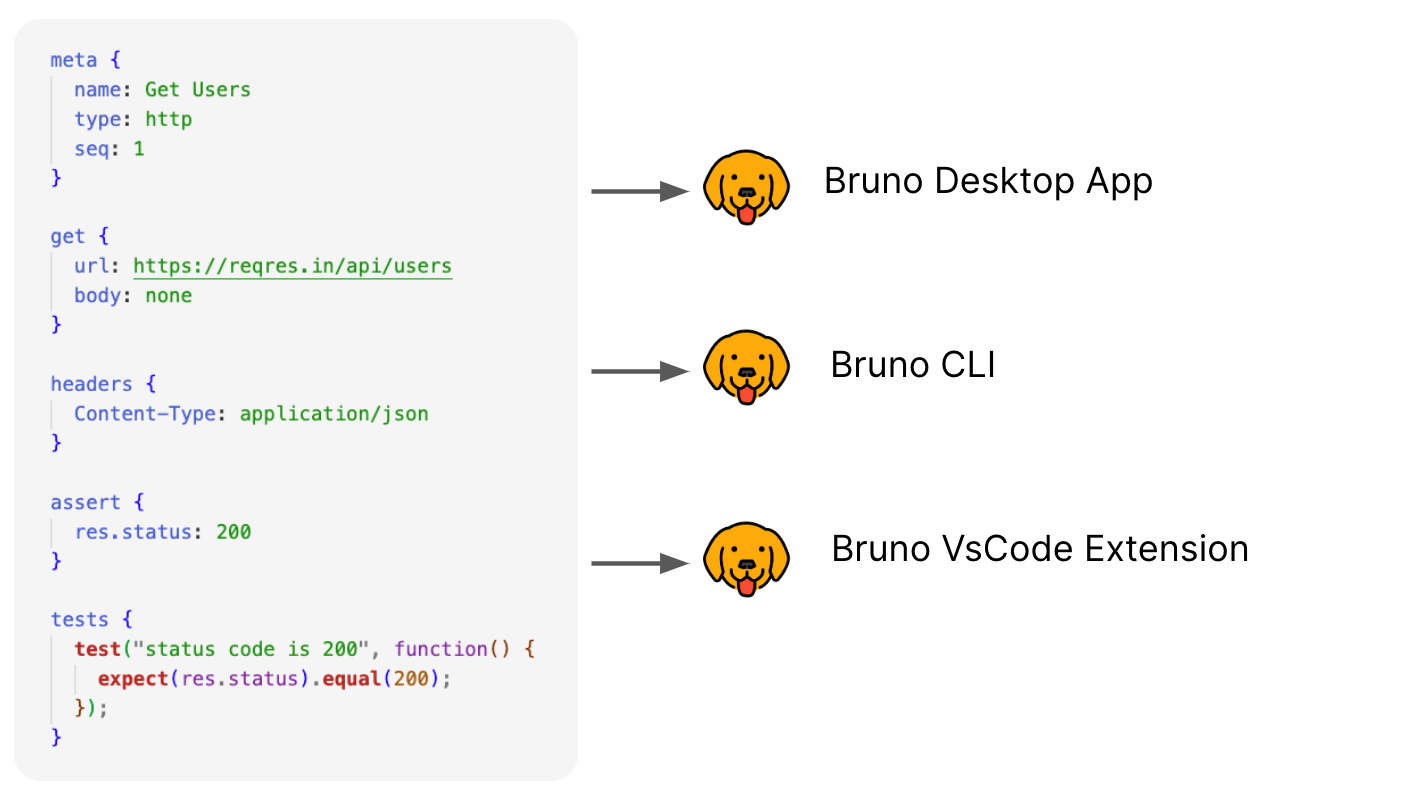
Images from the project's own README.
What it does
Bruno is a tool for sending requests to web APIs and inspecting the responses. Your request collections are saved as plain files on your computer rather than in someone else's cloud.
Who it's for
Developers and testers who work with APIs.
Key features
- Collections stored as local files
- Works offline, no login
- Git-friendly format
Often used instead of: Postman, Insomnia
Compatibility
NOVI never presents a guess as verified.- WindowsEvidence-supported
Available as an official WinGet package (“Bruno.Bruno”).
- macOS (Apple Silicon)Evidence-supported
Available as an official Homebrew Cask package (“bruno”).
- macOS (Intel)Evidence-supported
Available as an official Homebrew Cask package (“bruno”).
- LinuxEvidence-supported
Available as an official Flatpak (Flathub) package (“com.usebruno.Bruno”).
What do these labels mean?
- Confirmed
- NOVI users have completed verified installations on this system.
- Evidence-supported
- The project publishes an official build or package for this system.
- Inferred
- Likely to work based on how the project is built, but not confirmed.
- Unknown
- We have not found enough evidence either way.
- Unsupported
- The project does not support this system.
How to get it
Direct downloadDownload the official installer from the project or its publisher, then open it. Difficulty: Easy.
WindowsDirect downloadGuided
Download from the official release
File attached to the project's official GitHub release. NOVI links to it; the file comes straight from github.com, not from NOVI. Where this link comes from
- 1
After it downloads. Open the downloaded file (usually in your Downloads folder) and follow the installer. If Windows SmartScreen warns you, check that the file came from the address shown above before choosing to run it.
Install with WinGet
Installs Windows applications using WinGet, Microsoft's package manager included with Windows 10 and 11. You run these steps yourself; NOVI does not install anything from this website.
- 1
Open Windows Terminal or PowerShell. Right-click the Start button and choose Terminal. WinGet is included with Windows 10 (recent updates) and Windows 11; type “winget --version” to check.
- 2
Copy this command and press Enter. It installs the package from Microsoft's official WinGet catalogue. Windows may ask for administrator approval for some installers; only approve it if you trust this software.
winget install --id Bruno.Bruno --exact --source winget --accept-package-agreements --accept-source-agreements - 3
Check it worked. The app appears in your Start menu. This command lists it as installed:
winget list --id Bruno.Bruno --exact --source winget - 4
See the official package listing. Shows the publisher's installer that WinGet downloads. Open
macOS (Apple Silicon)Direct downloadGuided
Download from the official release
File attached to the project's official GitHub release. NOVI links to it; the file comes straight from github.com, not from NOVI. Where this link comes from
- 1
After it downloads. Open the downloaded file from your Downloads folder. For a .dmg, drag the app into Applications; for a .zip, double-click to unpack it, then move the app into Applications. The first time you open it, macOS may ask you to confirm.
Install with Homebrew Cask
Installs macOS applications using Homebrew, a widely used package manager for macOS. You run these steps yourself; NOVI does not install anything from this website.
- 1
Make sure Homebrew is installed. Homebrew is a free, widely used tool for installing software on a Mac. Open the Terminal app and type “brew --version”. If you see a version number you already have it; otherwise follow the one-line instructions on brew.sh. Open
- 2
Copy this command into Terminal and press Return. It installs the package from Homebrew's official catalogue only. Homebrew checks the download against a known checksum.
brew install --cask homebrew/cask/bruno - 3
Check it worked. The app appears in your Applications folder. You can also run this command to see the installed version:
brew list --cask --versions bruno - 4
See the official package listing. Shows exactly what Homebrew installs and where it comes from. Open
macOS (Intel)Direct downloadGuided
Download from the official release
File attached to the project's official GitHub release. NOVI links to it; the file comes straight from github.com, not from NOVI. Where this link comes from
- 1
After it downloads. Open the downloaded file from your Downloads folder. For a .dmg, drag the app into Applications; for a .zip, double-click to unpack it, then move the app into Applications. The first time you open it, macOS may ask you to confirm.
Install with Homebrew Cask
Installs macOS applications using Homebrew, a widely used package manager for macOS. You run these steps yourself; NOVI does not install anything from this website.
- 1
Make sure Homebrew is installed. Homebrew is a free, widely used tool for installing software on a Mac. Open the Terminal app and type “brew --version”. If you see a version number you already have it; otherwise follow the one-line instructions on brew.sh. Open
- 2
Copy this command into Terminal and press Return. It installs the package from Homebrew's official catalogue only. Homebrew checks the download against a known checksum.
brew install --cask homebrew/cask/bruno - 3
Check it worked. The app appears in your Applications folder. You can also run this command to see the installed version:
brew list --cask --versions bruno - 4
See the official package listing. Shows exactly what Homebrew installs and where it comes from. Open
LinuxDirect downloadGuided
Download from the official release
File attached to the project's official GitHub release. NOVI links to it; the file comes straight from github.com, not from NOVI. Where this link comes from
- 1
After it downloads. Open the downloaded file with your software centre, or follow the project's instructions for this file type (AppImage files need to be marked as executable first).
Install with Flatpak (Flathub)
Installs sandboxed Linux applications from Flathub for your user account only. You run these steps yourself; NOVI does not install anything from this website.
- 1
Make sure Flatpak and Flathub are set up. Many Linux systems include Flatpak. Flathub's setup page has short instructions for every major distribution. Open
- 2
Copy this command into a terminal and press Enter. It installs the app from Flathub for your user account only — no administrator password needed — and runs it in Flatpak's sandbox.
flatpak install --user flathub com.usebruno.Bruno - 3
Check it worked. The app appears in your applications menu. This command shows its details:
flatpak info --user com.usebruno.Bruno - 4
See the official Flathub page. Shows the app's permissions and who publishes it. Open
NOVI never installs software from your browser. Downloads come directly from the project or its publisher. Only install software you trust.
Get it working
A free, personal setup plan for your computer: the official download, exact steps, and a checklist. Saved in your dashboard, with help if you get stuck. NOVI never installs or runs anything on your computer.
Requirements
- Homebrew Cask for automatic install — Installs macOS applications using Homebrew, a widely used package manager for macOS. The NOVI companion checks whether it is present.
- WinGet for automatic install — Installs Windows applications using WinGet, Microsoft's package manager included with Windows 10 and 11. The NOVI companion checks whether it is present.
- Flatpak (Flathub) for automatic install — Installs sandboxed Linux applications from Flathub for your user account only. The NOVI companion checks whether it is present.
Cost: Core app is free; paid editions add extra features.
Trust and security
- license
Published under the MIT License (MIT).
Licence detected by GitHub from the repository's licence file. Read the full licence before modifying or redistributing.
Source - distribution
Distributed through Homebrew Cask, an established package source.
The package manager checks downloads against a published checksum before installing.
Source - distribution
Distributed through WinGet, an established package source.
The package manager checks downloads against a published checksum before installing.
Source - distribution
Distributed through Flatpak (Flathub), an established package source.
The package manager checks downloads against a published checksum before installing.
Source
NOVI checks licences, maintenance activity and distribution sources. NOVI has not audited this project's code and does not certify it as secure. Only install software you trust.
Reviews
No reviews yet
Be the first to share your experience with Bruno. NOVI never shows invented reviews.
Sign in to write a review.
Recent releases
From GitHubv4.3.0Oct 22, 2026
# Changelog ### Features - feat(converter): enhance OAuth2 token handling in processAuth function by @sanish-bruno in [#9454](https://github.com/usebruno/bruno/pull/9454) - feat(runner): store runner payloads in the file store by @chirag-bruno in [#9408](https://github.com/usebruno/bruno/pull/9408) - feat(sqlite-file): add a file store to the SQLite SDK by @chirag-bruno in [#9405](https://github.com/usebruno/bruno/pull/9405) - feat(openapi): revamp Create OpenAPI spec Modal by @adwait-bruno in [#9302](https://github.com/usebruno/bruno/pull/9302) - feat: show keyboard shortcut hints in menus by @lohit-bruno in [#9426](https://github.com/usebruno/bruno/pull/9426) - feat: add unresolved variables info card by @prateek-bruno in [#9401](https://github.com/usebruno/bruno/pull/9401) - feat(benchmark): utils to measure over checkpoints, spans, and also drain them by @sid-bruno in [#9292](https://github.com/usebruno/bruno/pull/9292) - feat(response-examples): implement "Try" functionality for response examples by @abhishekp-bruno in [#9342](https://github.com/usebruno/bruno/pull/9342) - feat: open sidebar openapi specs as workspace tabs by @sachin-bruno in [#9291](https://github.com/usebru
Full release notesv4.2.1Sep 30, 2026
### Security * **security: resolve real path in QuickJS sandbox** by @prateek-bruno in [#9226](https://github.com/usebruno/bruno/pull/9226) Local module paths are now resolved to their real path in the QuickJS runtime, preventing scripts from reaching files outside the intended location (e.g. via symlinks or path tricks). Credits to @wpframe for reporting this. * **security: stop exposing `__brunoLoadLocalModule` to scripts** by @prateek-bruno in [#9277](https://github.com/usebruno/bruno/pull/9277) Internal module loader is no longer accessible from user scripts, reducing the sandbox's attack surface. Credits to @wpframe for reporting this. **We recommend all users upgrade to this release.** **Full Changelog**: https://github.com/usebruno/bruno/compare/v4.2.0...v4.2.1
Full release notesv4.2.0Sep 23, 2026
# Changelog ### Features - feat(sidebar): support multi-select for request examples by @Gopi-bruno in [#9225](https://github.com/usebruno/bruno/pull/9225) - feat(environments): `collection` and `workspace` environments inheritance by @lohit-bruno in [#9136](https://github.com/usebruno/bruno/pull/9136) - feat(environment): redesign multi environment modal by @sachin-thakur-bruno in [#9179](https://github.com/usebruno/bruno/pull/9179) - feat(cli): Generate docs through cli by @sachin-bruno in [#9073](https://github.com/usebruno/bruno/pull/9073) - feat(grpc): add scripting support by @morsh-bruno in [#9144](https://github.com/usebruno/bruno/pull/9144) - feat(preferences): support page redesign by @sachin-thakur-bruno in [#9064](https://github.com/usebruno/bruno/pull/9064) - feat(runtime): expose __dirname, __filename within scripting context by @sanish-bruno in [#9101](https://github.com/usebruno/bruno/pull/9101) - feat(response-example): support previewing pdf images and videos for 'save responses' by @abhishekp-bruno in [#9000](https://github.com/usebruno/bruno/pull/9000) - feat(checkbox): adds checkbox component in ui with story and unit tests by @sachin-thakur-bruno in [#8861](ht
Full release notesv4.1.0Aug 20, 2026
# Changelog ### Features - feat: Mock Server implementation by @utkarsh-bruno and @shubh-bruno in [#8734](https://github.com/usebruno/bruno/pull/8734) - feat(docs): Rich text docs editor by @Gopi-bruno in [#8559](https://github.com/usebruno/bruno/pull/8559) - feat(cli): add --global-env-var to override global environment variables at runtime by @abhishekp-bruno in [#8620](https://github.com/usebruno/bruno/pull/8620) - feat(client certs): add global client certs and allow disabling individual client certs. by @morsh-bruno in [#8751](https://github.com/usebruno/bruno/pull/8751) - feat(auth-headers): handling authorization header leaks to third party servers on redirect by @Gopi-bruno in [#8380](https://github.com/usebruno/bruno/pull/8380) - feat(envs): adding search filter to environment selector dropdown by @Gopi-bruno in [#8277](https://github.com/usebruno/bruno/pull/8277) - feat(environment): add default env to presets by @sachin-thakur-bruno in [#8612](https://github.com/usebruno/bruno/pull/8612) - feat: support drag-and-drop and alphabetical sorting for variables by @adwait-bruno in [#8603](https://github.com/usebruno/bruno/pull/8603) - feat: add sorting to the secrets tab as w
Full release notesv4.0.0Jul 23, 2026
# Changelog ### Features - feat(app): migrate ctx API to bru.ctx by @gopu-bruno in [#8557](https://github.com/usebruno/bruno/pull/8557) - feat(overview): show human-readable size for unloaded requests by @chirag-bruno in [#8580](https://github.com/usebruno/bruno/pull/8580) - feat(description): file binary description implementation by @sid-bruno in [#8434](https://github.com/usebruno/bruno/pull/8434) - feat(ai): AI model handling with reasoning support by @naman-bruno in [#8539](https://github.com/usebruno/bruno/pull/8539) - feat: variable descriptions by @sid-bruno in [#8269](https://github.com/usebruno/bruno/pull/8269) - feat(snapshot): implement active workspace tab type tracking by @sid-bruno in [#8487](https://github.com/usebruno/bruno/pull/8487) - feat: Added the option for bruno version edit in the collection overview by @sachin-bruno in [#8424](https://github.com/usebruno/bruno/pull/8424) - feat(auth): akamai auth integration by @shubh-bruno in [#8199](https://github.com/usebruno/bruno/pull/8199) - feat(ai): add security preferences management to AI settings by @naman-bruno in [#8453](https://github.com/usebruno/bruno/pull/8453) - feat: Added collection name and minor UI c
Full release notes
Where this information comes from
- Description, audience and features: Written by NOVI editors from the project's README and official website. link
- Statistics, licence and releases: GitHub API link
- Available through Homebrew Cask: Official package registry link
- Available through WinGet: Official package registry link
- Available through Flatpak (Flathub): Official package registry link
- Direct download links: Files attached to the project's official GitHub release v4.3.0 link
GitHub data last refreshed 3 days ago. Bruno is the property of its authors. NOVI is not affiliated with this project.