NOVI product
NOVI Clean Share
See what your photos and documents reveal — and remove it — before you send them.
Available to everyone as a beta: expect rough edges.
The problem
Photos carry the exact place they were taken; Word, Excel and PowerPoint files carry author names, company names, comments, deleted wording in tracked changes, hidden sheets and speaker notes. People share these files without knowing. Most checking tools list technical fields; few show what the hidden content actually says, help resolve it safely, or prove the clean copy kept its content.
Who it's for
People who send files outside their circle: job seekers, freelancers, small businesses, students submitting anonymised work, landlords and tenants, anyone selling items online.
What it does
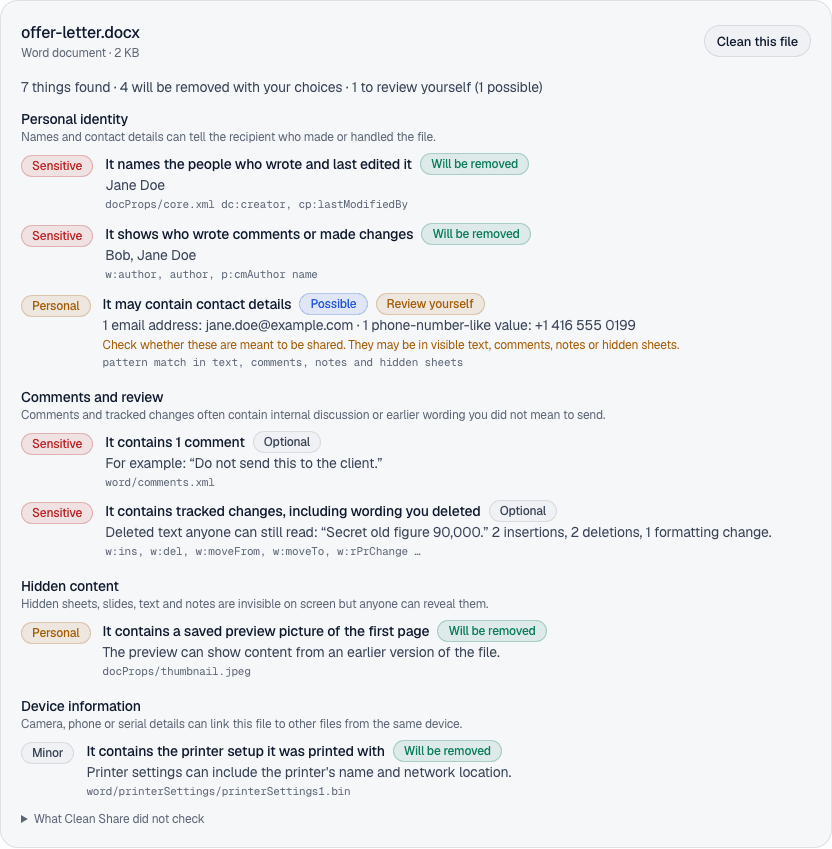
Clean Share checks photos and Office documents on your own device and explains, in plain language, what each file reveals: where a photo was taken, who wrote a document, comments, deleted wording still hidden in tracked changes, hidden sheets and speaker notes. It removes what you choose, then re-opens the clean copy to prove the selected items are gone and the visible content is unchanged. Files are never uploaded.
- Plain-language findings grouped by what they reveal, with the technical field names for experts
- Shows what comments, deleted wording and speaker notes actually say
- Choose what to remove; content-changing options are off unless you turn them on
- Word: delete all comments or accept all tracked changes — verified against the expected text
- Removes document properties, reviewer names, preview pictures, printer settings and the last-save folder
- Flags possible email addresses, phone numbers and card numbers, including in comments and hidden sheets
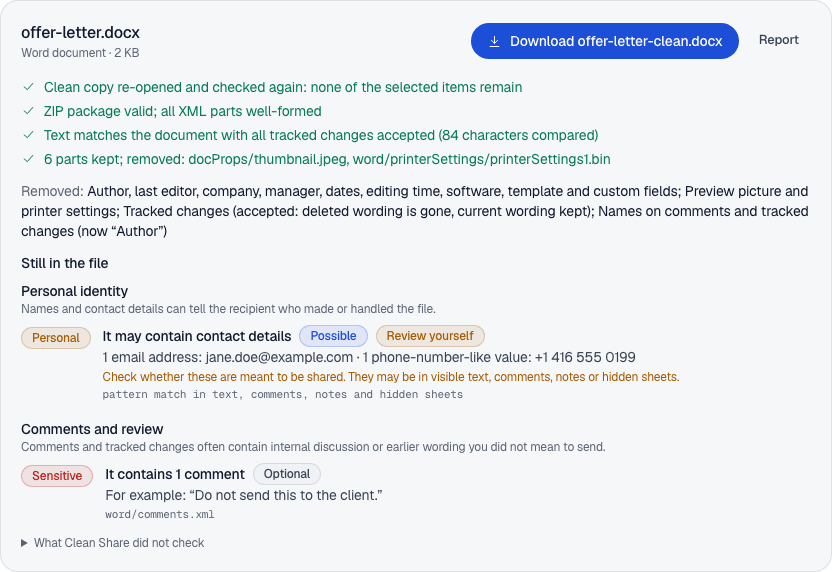
- Every clean copy is re-opened and checked; nothing is offered if verification fails
- With NOVI Pro: batches of up to 50 files, with a ZIP of clean copies and a report for each
- PDF: removes author and properties, XMP metadata, earlier saved versions and private editing-app data; flags comments, scripts and attachments
Files say more than you see
A holiday photo posted to sell a bike can contain the GPS position of your home.
An offer letter can still hold the salary you deleted, readable in the tracked changes.
A client spreadsheet can carry a hidden sheet, internal comments and the folder it was saved in — with your user name.
What it looks like
Screenshots of the actual app, using made-up sample files.
How it works
- 1.
Add files
Drop photos or documents — up to 50 at a time. They stay on your device.
- 2.
Read the findings
Each file is checked and explained in plain language, grouped by what it reveals.
- 3.
Choose
Pick what to remove. Anything that would change your content is off unless you turn it on.
- 4.
Download verified copies
Each copy is re-checked before you can download it. Your originals are never changed.
What it finds
- Photos
- Where a photo was taken (GPS), the camera or phone, its serial number, dates, names, captions and editing history (EXIF, XMP, IPTC) — including photos placed inside documents.
- Word
- Author and last editor, company, dates and editing time, custom fields, names on comments and changes, every comment (with its text), tracked changes (with the deleted wording), hidden text, links to files on someone's computer, embedded files.
- Excel
- The same document properties, hidden sheets (by name), hidden rows and columns, links to other workbooks, the folder where it was last saved, comments.
- PowerPoint
- The same document properties, hidden slides, speaker notes (with their text), comments and comment authors.
- Possible contact details
- Email addresses, phone numbers and payment-card-like numbers anywhere in the text — including comments, notes and hidden sheets. These are marked “possible” and never removed automatically.
Removed for you (on by default)
Photo location, camera and editing data · document authors, company, dates, editing time, software, template and custom fields · names on comments and changes · preview pictures · printer settings · the last-save folder.
Removed only if you choose (Word)
Delete every comment · accept every tracked change, so deleted wording is gone for good. Both are verified against the text you should end up with.
Shown for your own review
Hidden sheets, rows and slides · speaker notes · hidden text · comments in Excel and PowerPoint · links to other files · embedded files · macros · possible contact details.
Categories used in reports: Personal identity · Location · Device information · Company information · Document history · Comments and review · Hidden content · Embedded files · Not checked.
Private by design
- Files are read and cleaned in your browser; there is no upload.
- No advertising, outside analytics or third-party scripts run on NOVI's pages (visits are only counted privately by NOVI's own server).
- No AI looks at your files.
- Reports are created on your device and include values only when you download them.
What it can't do
- It does not read what is visible in pictures (faces, signs, screens).
- It does not check files embedded inside documents, macros or cloud version history.
- Password-protected PDFs, HEIC/HEIF, GIF, SVG, TIFF, RAW photos, videos, OpenDocument (ODT, ODS, ODP) and older Office files (DOC, XLS, PPT) are not supported yet: Clean Share can neither check nor clean them.
- It cannot make a file anonymous; it removes the hidden information it supports.
Questions
Are my files uploaded?
No. Clean Share reads and rewrites files inside your browser. The page makes no request containing your files — NOVI's automated tests check this on every change. Once the page has loaded, cleaning works offline.
Will it change my document?
Not unless you ask. By default it removes only information that is not part of what the document says (properties, names, preview pictures, photo data). Deleting comments and accepting tracked changes are separate choices, off until you turn them on.
How do I know it worked?
Every clean copy is re-opened and checked again. Clean Share confirms the selected items are gone, the file structure is valid, and the visible text (or image data) is unchanged — or, if you chose to accept tracked changes, that the text matches the accepted version. If any check fails, no clean copy is offered.
Does a clean file mean I'm anonymous?
No. What you can see in the text or the picture can still identify people, and some areas are not checked (each report lists them). Clean Share removes the hidden information it supports — nothing more is promised.
Why do some items say “Review yourself”?
Removing them would change what your file says — for example hidden sheets or speaker notes. Clean Share shows what they contain and how to remove them in Office, so you decide.
Which files are supported?
JPEG photos, PNG images, WebP images, Word documents, Excel workbooks, PowerPoint presentations, PDF documents. Password-protected PDFs, HEIC/HEIF, GIF, SVG, TIFF, RAW photos, videos, OpenDocument (ODT, ODS, ODP) and older Office files (DOC, XLS, PPT) are not supported yet: Clean Share can neither check nor clean them.
What does it cost?
Checking and cleaning one file at a time is free. Batches of up to 50 files are part of NOVI Pro, an optional subscription — see Pricing.
Something else? Support
Privacy
Clean Share reads and cleans files only inside your browser. NOVI never receives your files, their contents or the findings. No account is needed to use it.
Price
Free to check and clean one file at a time, including PDFs. Batches of up to 50 files and verification reports for each are part of NOVI Pro (see Pricing).
Requirements
A recent version of Chrome, Firefox or Safari on a computer (other browsers have not been tested yet). Supports JPEG, PNG and WebP images, Word, Excel and PowerPoint files (.docx, .xlsx, .pptx) and PDFs that are not password-protected, up to 100 MB each.
Release history
- 0.2.0Private betaNov 16, 2026Categories with plain-language explanations; previews of comments, deleted wording and speaker notes; selectable cleanup; Word comment removal and tracked-change acceptance (opt-in); preview picture, printer settings and last-save folder removal; contact-detail and card-number checks; structural and text-preservation verification; WebP; batch ZIP with reports.
- 0.1.0Internal testingNov 16, 2026First internal build: JPEG, PNG, Word, Excel, PowerPoint. Inspect, clean, verify.
Licence: Proprietary NOVI software (draft licence, not yet legally reviewed). Runtime dependency: pdf-lib (MIT), used on your device for PDF files. · Support